How to Calculate ROI in Jira for Better Investment Decisions Using Dynamic Scoring
Return on Investment (ROI) is essential for teams evaluating whether a feature, project, or initiative is worth the cost. But Jira was never designed for financial metrics until now.
Dynamic Scoring for Jira introduces a dedicated Financial scoring model that lets teams calculate ROI directly in the issue view, turning Jira into a lightweight investment assessment platform.
Why ROI Matters for Modern Product Organizations
ROI is one of the simplest and most universal financial metrics:
ROI = (Value – Cost) ÷ Cost
ROI provides three powerful benefits:
1. Strong business justification
It gives leadership a clear, quantitative view of why a feature deserves investment.
2. Improved capital allocation
Portfolios often have dozens of competing initiatives; ROI highlights which ones bring the biggest return per dollar spent.
3. Clearer decision-making
ROI supports go/no-go decisions, especially for expensive projects.
Why ROI in Jira Is Hard Without a Tool
Teams typically rely on:
- spreadsheets
- slide decks
- rough “effort vs. value” discussions
This leads to scattered documentation and data that quickly becomes outdated.
With Dynamic Scoring, ROI becomes:
- consistent
- visible
- part of every issue
- easy to compare across epics and features
How to Configure ROI in Jira Using Dynamic Scoring
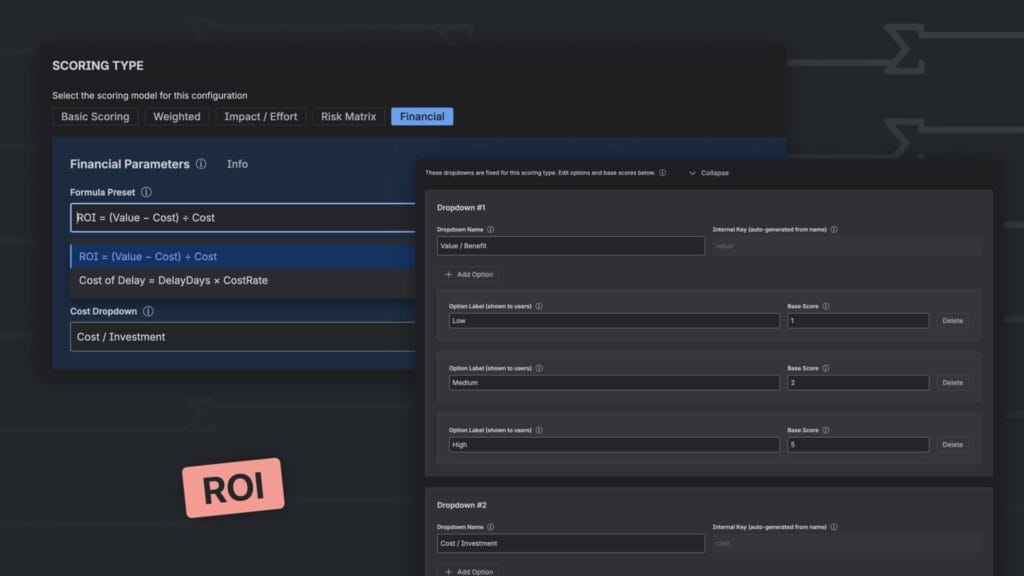
Best Model: Financial
The Financial scoring type includes a built-in ROI formula.
Step-by-Step ROI Configuration
1. Create the Configuration
Name: ROI
2. Select Scoring Type
Choose: Financial
3. Add the required dropdowns
| Field | Purpose | Options |
|---|---|---|
| Value / Benefit | Expected business or customer value | Low / Medium / High |
| Cost / Investment | Cost, effort, or budget | Low / Medium / High |
You can assign real numerical values or proxy scores.
4. Select Formula Preset
Choose the built-in formula:
ROI = (Value – Cost) ÷ Cost
5. Save → Use in Jira Issue View
Instant ROI scoring for every initiative.
How Agile Teams Use ROI in Practice

• Strategic Roadmapping
Helps prioritize high-value long-term projects.
• Leadership alignment
Provides a shared financial language between PMs, Engineering, and executives.
• Portfolio management
Supports multi-product organizations selecting which initiatives to fund.
Beyond ROI
Dynamic Scoring also supports:
- Risk-adjusted ROI
- Weighted decision models
- Risk Matrix scoring
- WSJF and other Lean metrics
- Custom formulas for financial teams
This flexibility makes it useful for both product and strategic leadership.
Read More
[{"id":4680,"link":"https:\/\/typeswitch.net\/blog\/design-tokens-generator\/","name":"design-tokens-generator","thumbnail":{"url":"https:\/\/typeswitch.net\/wp-content\/uploads\/2026\/07\/visualsnag-catch-style-from-website-or-visual-reference.jpg","alt":"catch-style-from-website-or-visual-reference"},"title":"How to Generate Design Tokens From a Website Screenshot","postMeta":[],"author":{"name":"Babenko Maksym","link":"https:\/\/typeswitch.net\/blog\/author\/max-babenko\/"},"date":"\u041b\u0438\u043f 23, 2026","dateGMT":"2026-07-23 08:06:56","modifiedDate":"2026-07-23 08:30:46","modifiedDateGMT":"2026-07-23 08:30:46","commentCount":"0","commentStatus":"closed","categories":{"coma":"<a href=\"https:\/\/typeswitch.net\/blog\/category\/visualsnag\/\" rel=\"category tag\">VisualSnag<\/a>","space":"<a href=\"https:\/\/typeswitch.net\/blog\/category\/visualsnag\/\" rel=\"category tag\">VisualSnag<\/a>"},"taxonomies":{"post_tag":""},"readTime":{"min":6,"sec":34},"status":"publish","content":"Creating a consistent interface is much easier when visual decisions are written down as reusable rules. Those rules are called"},{"id":4524,"link":"https:\/\/typeswitch.net\/blog\/best-language-switcher-macos\/","name":"best-language-switcher-macos","thumbnail":{"url":"https:\/\/typeswitch.net\/wp-content\/uploads\/2024\/11\/Type-Switch-Personalize-Your-Button.png","alt":"Minimalist design of Type Switch app for language changes on macOS."},"title":"Best Language Switcher for macOS in 2026: Type Switch for Multilingual Typing","postMeta":[],"author":{"name":"Babenko Maksym","link":"https:\/\/typeswitch.net\/blog\/author\/max-babenko\/"},"date":"\u0422\u0440\u0430 17, 2026","dateGMT":"2026-05-17 13:47:43","modifiedDate":"2026-05-17 13:56:53","modifiedDateGMT":"2026-05-17 13:56:53","commentCount":"0","commentStatus":"closed","categories":{"coma":"<a href=\"https:\/\/typeswitch.net\/blog\/category\/uncategorized\/\" rel=\"category tag\">Uncategorized<\/a>","space":"<a href=\"https:\/\/typeswitch.net\/blog\/category\/uncategorized\/\" rel=\"category tag\">Uncategorized<\/a>"},"taxonomies":{"post_tag":""},"readTime":{"min":7,"sec":17},"status":"publish","content":"Working with multiple languages on your Mac should feel natural. But for many people, switching keyboard languages is still one"},{"id":4510,"link":"https:\/\/typeswitch.net\/blog\/best-developer-tools-macos-2026\/","name":"best-developer-tools-macos-2026","thumbnail":{"url":"https:\/\/typeswitch.net\/wp-content\/uploads\/2026\/05\/Preview_1_en.jpg","alt":"quick notes app for Mac"},"title":"Best Developer Tools for macOS in 2026: Essential Mac Apps for Coding","postMeta":[],"author":{"name":"Babenko Maksym","link":"https:\/\/typeswitch.net\/blog\/author\/max-babenko\/"},"date":"\u0422\u0440\u0430 17, 2026","dateGMT":"2026-05-17 07:32:59","modifiedDate":"2026-05-17 07:46:13","modifiedDateGMT":"2026-05-17 07:46:13","commentCount":"0","commentStatus":"closed","categories":{"coma":"<a href=\"https:\/\/typeswitch.net\/blog\/category\/uncategorized\/\" rel=\"category tag\">Uncategorized<\/a>","space":"<a href=\"https:\/\/typeswitch.net\/blog\/category\/uncategorized\/\" rel=\"category tag\">Uncategorized<\/a>"},"taxonomies":{"post_tag":""},"readTime":{"min":9,"sec":1},"status":"publish","content":"macOS is still one of the best environments for developers in 2026. You get a Unix-based system, strong hardware, great"},{"id":4402,"link":"https:\/\/typeswitch.net\/blog\/confluence-public-links-alternative\/","name":"confluence-public-links-alternative","thumbnail":{"url":"https:\/\/typeswitch.net\/wp-content\/uploads\/2026\/05\/Confluence-public-links-alternative.png","alt":"Illustration showing Confluence pages published to the public web with Public Pages for Confluence"},"title":"Confluence Public Links Alternative: Publish Pages with SEO, Branding and Custom Domains","postMeta":[],"author":{"name":"Babenko Maksym","link":"https:\/\/typeswitch.net\/blog\/author\/max-babenko\/"},"date":"\u0422\u0440\u0430 8, 2026","dateGMT":"2026-05-08 16:02:11","modifiedDate":"2026-05-08 17:59:18","modifiedDateGMT":"2026-05-08 17:59:18","commentCount":"0","commentStatus":"closed","categories":{"coma":"<a href=\"https:\/\/typeswitch.net\/blog\/category\/atlassian\/\" rel=\"category tag\">Atlassian<\/a>","space":"<a href=\"https:\/\/typeswitch.net\/blog\/category\/atlassian\/\" rel=\"category tag\">Atlassian<\/a>"},"taxonomies":{"post_tag":""},"readTime":{"min":7,"sec":27},"status":"publish","content":"By Maksym Babenko \u00b7 ~5 min read \u00b7 May 8, 2026 Confluence public links are useful when you need to share a page"}]