Working with multiple languages on your Mac doesn’t have to slow you down. Whether you write content, code, study, or manage international communication, constantly switching keyboard languages can break your flow.
MacOS includes built-in tools, but they’re often limited, inconvenient, or too slow for people who need seamless multilingual typing.
Type Switch for macOS changes that.
It’s a powerful, customizable language switcher for macOS designed to make multilingual writing simple, instant, and frustration-free.
Why Type Switch is the Best Language Switcher for Mac
Type Switch was created by a long-time Apple user who struggled with slow, inconsistent language switching. The goal was clear: build a tool that works instantly and fits naturally into any workflow.
Here’s what makes Type Switch stand out:
Instant Language Switching
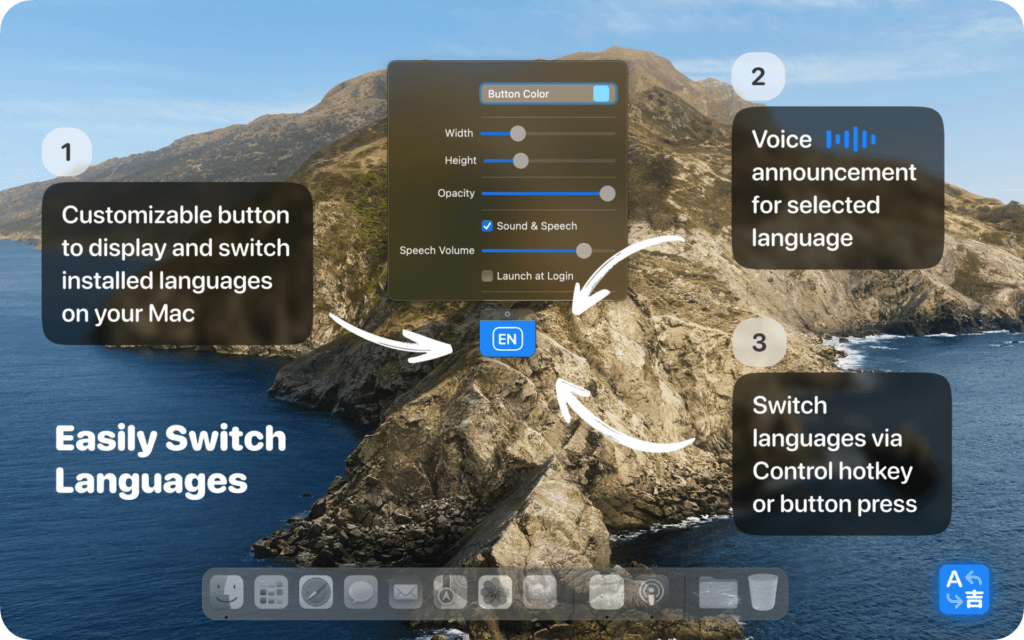
Toggle between all installed input languages in a split second. No menus, no searching, no interruptions, just fast language switching exactly when you need it.
Customizable Floating Button
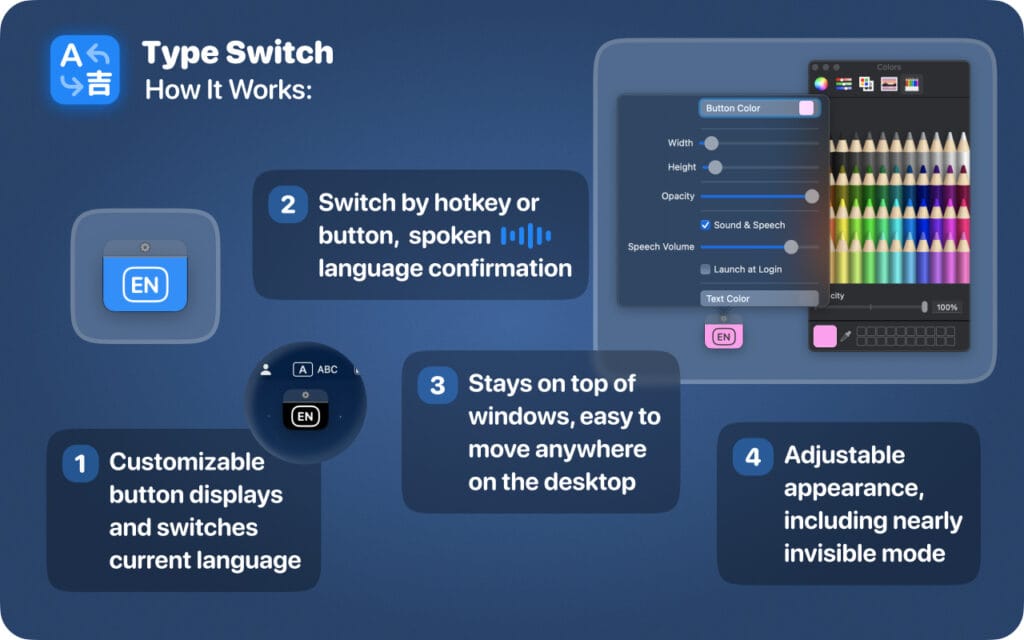
Choose the button’s size, color, transparency, and position. Keep it subtle or make it bold whatever fits your personal workflow and Mac setup.
Audio & Voice Feedback
Never wonder which language you’re typing in. Type Switch can play a sound or announce the selected language so you always stay on track.
Minimal, Modern macOS Design
The elegant floating button uses clean visuals and language icons without cluttering your screen. It stays visible but never distracts you.
Hotkey Support
Prefer shortcuts? Switch languages instantly with the default Control (⌃) key, Double Shift or use the button itself if you like visual feedback.
How Type Switch Improves Productivity for Writers, Coders, Students, and Professionals
1. Writing Multilingual Text Without Mistakes
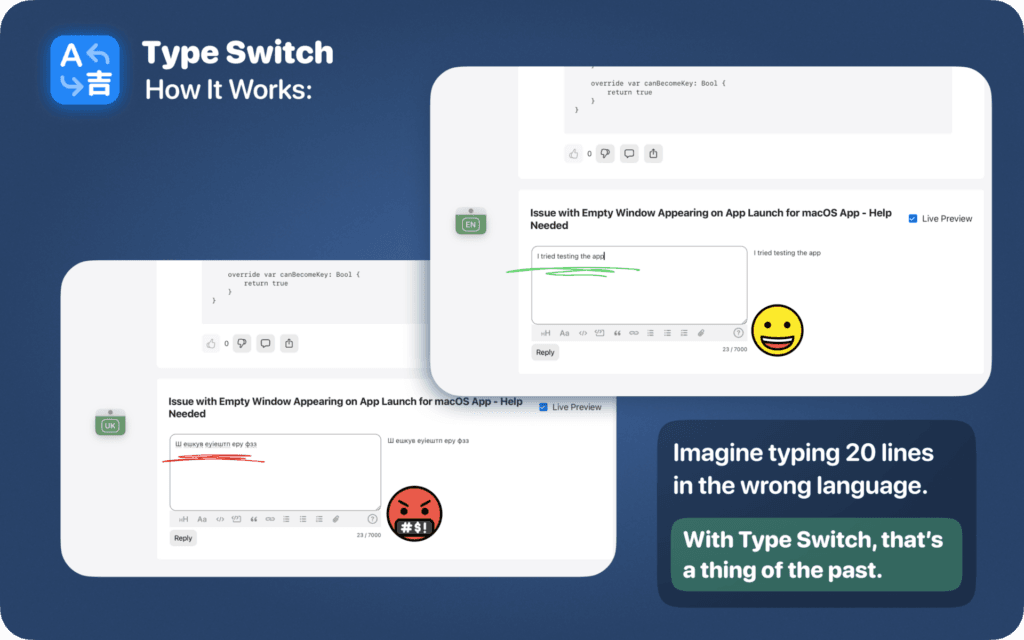
If you write in multiple languages, English, Ukrainian, Spanish, or anything else you know the pain of typing a full sentence in the wrong layout.
With Type Switch, you can change languages instantly with a single click or key press. The visual and audio indicators make accidental “wrong keyboard” mistakes a thing of the past.
2. Coding Across Different Locales
Developers often switch layouts to type special characters, write comments in another language, or test different locales.
Type Switch ensures smooth, reliable switching so you stay focused on your code not on keyboard settings.
3. Students Working with Notes, Essays, and Research
Studying in different languages becomes much easier when switching layouts takes less than a second.
Type Switch helps students move between languages quickly while writing essays, taking notes, or working with sources, all with clear feedback so they never lose track.
4. International Business Communication
If your work involves writing emails or documents in different languages, accuracy matters.
Type Switch lets you jump between languages effortlessly, helping you maintain professionalism and avoid embarrassing typos or incorrect scripts in business correspondence.
Why You’ll Love Type Switch
- Faster typing across all languages
- Zero interruptions to your writing or coding flow
- Fully customizable design
- Clear sound or speech cues
- Clean interface designed specifically for macOS users
Type Switch is simply the most efficient and intuitive way to switch languages on a Mac.
Final Thoughts
If you frequently type in multiple languages, a reliable language switcher is essential for staying productive.
Type Switch brings speed, accuracy, and customization to macOS language switching — helping you focus on your work instead of your keyboard.
With its modern design and smart features, Type Switch can dramatically improve your multilingual workflow and eliminate time-wasting typing errors.
Download Type Switch on the App Store
Experience the fastest and most intuitive language switcher for macOS.
👉 Download here: https://apple.co/3ZmYZXH
Boost your productivity, avoid mistakes, and enjoy a smoother typing experience with Type Switch the ultimate Mac language switcher.
Read More
[{"id":4680,"link":"https:\/\/typeswitch.net\/blog\/design-tokens-generator\/","name":"design-tokens-generator","thumbnail":{"url":"https:\/\/typeswitch.net\/wp-content\/uploads\/2026\/07\/visualsnag-catch-style-from-website-or-visual-reference.jpg","alt":"catch-style-from-website-or-visual-reference"},"title":"How to Generate Design Tokens From a Website Screenshot","postMeta":[],"author":{"name":"Babenko Maksym","link":"https:\/\/typeswitch.net\/blog\/author\/max-babenko\/"},"date":"\u041b\u0438\u043f 23, 2026","dateGMT":"2026-07-23 08:06:56","modifiedDate":"2026-07-23 08:30:46","modifiedDateGMT":"2026-07-23 08:30:46","commentCount":"0","commentStatus":"closed","categories":{"coma":"<a href=\"https:\/\/typeswitch.net\/blog\/category\/visualsnag\/\" rel=\"category tag\">VisualSnag<\/a>","space":"<a href=\"https:\/\/typeswitch.net\/blog\/category\/visualsnag\/\" rel=\"category tag\">VisualSnag<\/a>"},"taxonomies":{"post_tag":""},"readTime":{"min":6,"sec":34},"status":"publish","content":"Creating a consistent interface is much easier when visual decisions are written down as reusable rules. Those rules are called"},{"id":4524,"link":"https:\/\/typeswitch.net\/blog\/best-language-switcher-macos\/","name":"best-language-switcher-macos","thumbnail":{"url":"https:\/\/typeswitch.net\/wp-content\/uploads\/2024\/11\/Type-Switch-Personalize-Your-Button.png","alt":"Minimalist design of Type Switch app for language changes on macOS."},"title":"Best Language Switcher for macOS in 2026: Type Switch for Multilingual Typing","postMeta":[],"author":{"name":"Babenko Maksym","link":"https:\/\/typeswitch.net\/blog\/author\/max-babenko\/"},"date":"\u0422\u0440\u0430 17, 2026","dateGMT":"2026-05-17 13:47:43","modifiedDate":"2026-05-17 13:56:53","modifiedDateGMT":"2026-05-17 13:56:53","commentCount":"0","commentStatus":"closed","categories":{"coma":"<a href=\"https:\/\/typeswitch.net\/blog\/category\/uncategorized\/\" rel=\"category tag\">Uncategorized<\/a>","space":"<a href=\"https:\/\/typeswitch.net\/blog\/category\/uncategorized\/\" rel=\"category tag\">Uncategorized<\/a>"},"taxonomies":{"post_tag":""},"readTime":{"min":7,"sec":17},"status":"publish","content":"Working with multiple languages on your Mac should feel natural. But for many people, switching keyboard languages is still one"},{"id":4510,"link":"https:\/\/typeswitch.net\/blog\/best-developer-tools-macos-2026\/","name":"best-developer-tools-macos-2026","thumbnail":{"url":"https:\/\/typeswitch.net\/wp-content\/uploads\/2026\/05\/Preview_1_en.jpg","alt":"quick notes app for Mac"},"title":"Best Developer Tools for macOS in 2026: Essential Mac Apps for Coding","postMeta":[],"author":{"name":"Babenko Maksym","link":"https:\/\/typeswitch.net\/blog\/author\/max-babenko\/"},"date":"\u0422\u0440\u0430 17, 2026","dateGMT":"2026-05-17 07:32:59","modifiedDate":"2026-05-17 07:46:13","modifiedDateGMT":"2026-05-17 07:46:13","commentCount":"0","commentStatus":"closed","categories":{"coma":"<a href=\"https:\/\/typeswitch.net\/blog\/category\/uncategorized\/\" rel=\"category tag\">Uncategorized<\/a>","space":"<a href=\"https:\/\/typeswitch.net\/blog\/category\/uncategorized\/\" rel=\"category tag\">Uncategorized<\/a>"},"taxonomies":{"post_tag":""},"readTime":{"min":9,"sec":1},"status":"publish","content":"macOS is still one of the best environments for developers in 2026. You get a Unix-based system, strong hardware, great"},{"id":4402,"link":"https:\/\/typeswitch.net\/blog\/confluence-public-links-alternative\/","name":"confluence-public-links-alternative","thumbnail":{"url":"https:\/\/typeswitch.net\/wp-content\/uploads\/2026\/05\/Confluence-public-links-alternative.png","alt":"Illustration showing Confluence pages published to the public web with Public Pages for Confluence"},"title":"Confluence Public Links Alternative: Publish Pages with SEO, Branding and Custom Domains","postMeta":[],"author":{"name":"Babenko Maksym","link":"https:\/\/typeswitch.net\/blog\/author\/max-babenko\/"},"date":"\u0422\u0440\u0430 8, 2026","dateGMT":"2026-05-08 16:02:11","modifiedDate":"2026-05-08 17:59:18","modifiedDateGMT":"2026-05-08 17:59:18","commentCount":"0","commentStatus":"closed","categories":{"coma":"<a href=\"https:\/\/typeswitch.net\/blog\/category\/atlassian\/\" rel=\"category tag\">Atlassian<\/a>","space":"<a href=\"https:\/\/typeswitch.net\/blog\/category\/atlassian\/\" rel=\"category tag\">Atlassian<\/a>"},"taxonomies":{"post_tag":""},"readTime":{"min":7,"sec":27},"status":"publish","content":"By Maksym Babenko \u00b7 ~5 min read \u00b7 May 8, 2026 Confluence public links are useful when you need to share a page"}]