Risk management in Jira is the practice of identifying, scoring, and tracking potential delivery problems directly inside Jira issues, before they become sprint failures, missed deadlines, or stakeholder surprises.
In 2026, software teams ship faster than ever. AI copilots write code. Releases happen continuously. But speed without visibility creates a predictable problem: teams discover blockers mid-sprint instead of catching them during planning.
This guide explains what effective Jira risk management looks like, why most teams skip it, and how embedding risk signals directly into your workflow changes outcomes.
What Does Risk Management in Jira Actually Mean?
Risk management in Jira does not mean spreadsheets, approval committees, or formal risk registers.
For Agile teams, it means answering three questions before work begins:
- How likely is this issue to fail or get blocked?
- If it fails, how much does it affect the sprint or release?
- How hard would it be to recover?
When these questions are answered inside the Jira issue, during backlog refinement or sprint planning, teams gain clarity that dashboards and reports cannot provide after the fact.
Why Is Jira Risk Visibility Critical in 2026?
Modern software delivery environments have specific characteristics that make unmanaged risk more dangerous than in previous years:
- Third-party API dependencies create invisible failure points
- AI-generated code increases output speed but reduces predictability
- Distributed teams across time zones delay problem detection
- Continuous deployment pipelines reduce the window to catch issues before they reach production
The most effective teams in 2026 don’t eliminate risk — they make it visible early ( Atlassian Developer Community ). The difference between a team that consistently delivers and one that constantly scrambles is rarely technical skill. It is how early warning signals are surfaced and acted on.
What Happens When Teams Skip Risk Assessment in Jira
Here is a realistic scenario that plays out in Agile teams every week.
A team adds a payment provider integration to the sprint. The Jira issue looks clean: clear acceptance criteria, reasonable estimate, familiar technology stack.
No one evaluates risk.
By day four, the payment service starts rate-limiting API requests. Unexpected edge cases appear. The test environment behaves differently from production. The team scrambles. Velocity drops. The sprint goal is missed.
Now replay the same scenario with risk awareness embedded.
During planning, someone scores the issue:
- Likelihood of blocking: High
- Impact on sprint: High
- Effort to fix: Medium
The team assigns a senior engineer. They allocate buffer time. They design fallback logic in advance.
The task is still complex. But it is no longer surprising.
Who Benefits from Jira Risk Tracking
Risk visibility inside Jira is not only for developers. Each role gains something specific.
Scrum Masters get a structured signal for sprint planning conversations, a way to surface hidden uncertainty during refinement, and better retrospective data on how risk was handled.
Engineering Managers get early warning before commitments slip, visibility into which items need senior attention, and data to balance sprint load with delivery confidence.
Product Owners get a clearer basis for prioritization trade-offs, early signals before deadlines are at risk, and stronger stakeholder communication when scope or timeline needs adjustment.
Kanban Leads get insight into which items deserve closer monitoring and a visual cue when high-uncertainty work enters the active flow.
How Risk Radar Adds Risk Visibility Inside Jira
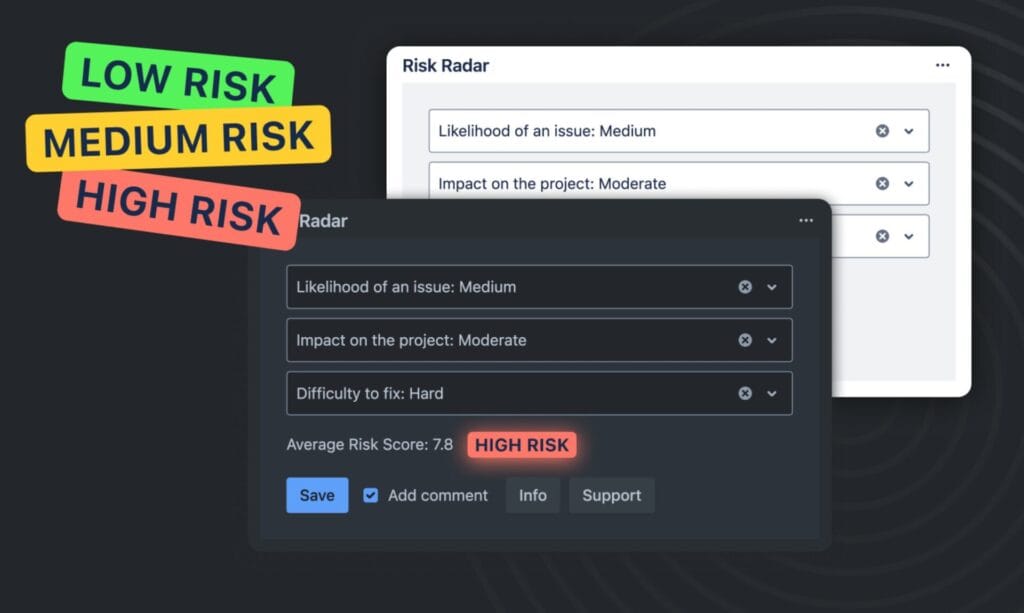
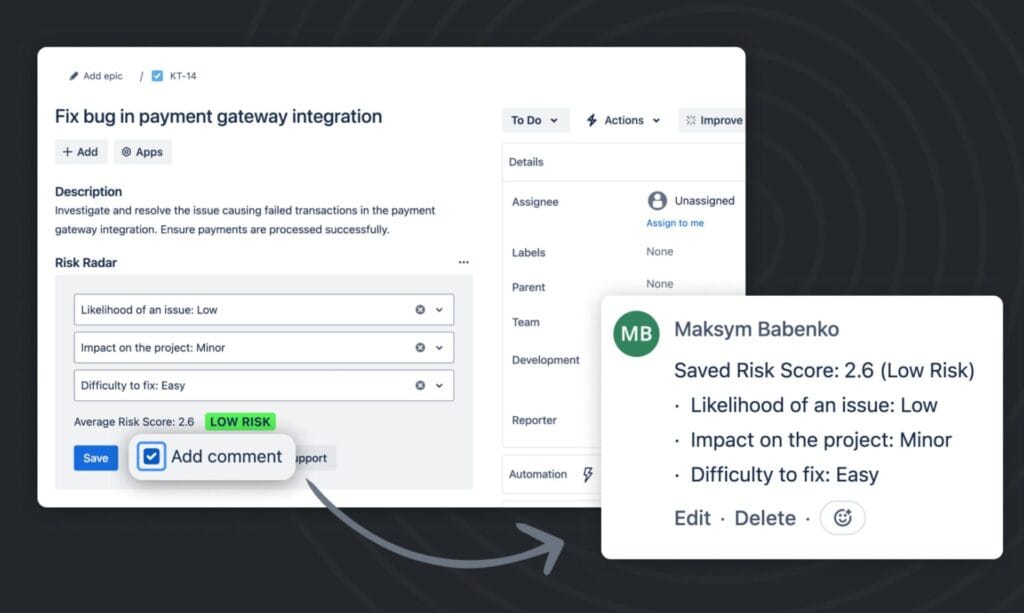
Risk Radar is a Jira app that embeds risk scoring directly inside each issue — without external dashboards, spreadsheets, or context switching.
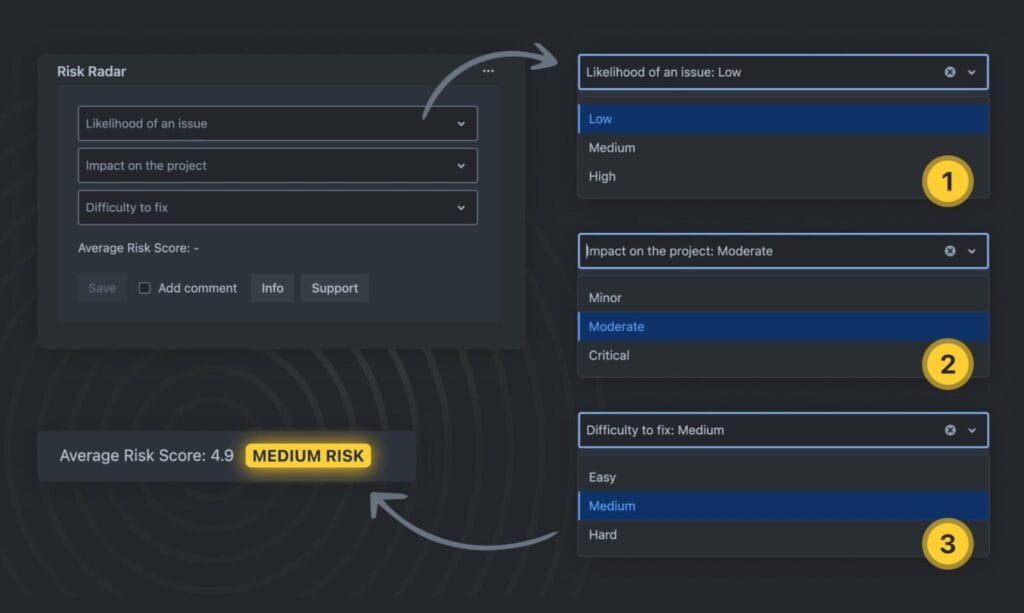
Inside each Jira issue, team members score three dimensions:
| Dimension | What It Measures |
|---|---|
| Likelihood | Probability this issue gets blocked or fails |
| Impact | Consequence to sprint, release, or stakeholders |
| Difficulty to Fix | Effort required to recover if the problem occurs |
Risk Radar calculates a composite score and displays a visual indicator directly in the issue view. The entire process takes seconds and integrates into your existing Jira workflow.
The result: risk becomes part of the conversation during grooming, not a post-mortem topic after the sprint fails.
How to Build a Risk Awareness Habit Without Adding Process
You do not need a formal risk management program. You need a lightweight habit at three points in your workflow.
During backlog refinement: Before estimating, pause and score risk. Issues that score high on likelihood and impact should be flagged for closer attention during sprint planning.
During sprint planning: Check the distribution of high-risk items. A sprint with five high-risk issues loaded into one week is a sprint that is already in trouble.
During retrospectives: Review how identified risks played out. Did the team catch them early? Did the scoring prove accurate? This improves calibration over time.
Risk Radar supports this habit without replacing your existing process. It adds a structured layer of awareness where the work already lives.
Frequently Asked Questions About Risk Management in Jira
What is the difference between risk management in Jira and traditional project risk management? Traditional risk management creates separate registers, documents, and approval processes outside the work. Jira risk management embeds assessment directly into the issue where the work is tracked, making it lightweight and actionable for Agile teams.
Can risk tracking work in Kanban as well as Scrum? Yes. For Kanban teams, risk scoring is useful at the point of commitment — when an issue moves from backlog to active development. High-risk items can be flagged for pair work or additional review before entering the WIP limit.
How long does it take to score risk on a Jira issue? With Risk Radar, scoring takes 15–30 seconds per issue. The three-dimension model (Likelihood, Impact, Difficulty to Fix) is simple enough to complete during grooming without slowing the meeting down.
Does risk scoring work for non-technical Jira issues like marketing or ops tasks? Yes. The likelihood-impact-effort model applies to any type of work with uncertainty. Marketing campaigns, vendor integrations, compliance tasks, and operational changes all carry risk that benefits from early visibility.
What makes Risk Radar different from Jira’s built-in features? Jira does not have native risk scoring. Built-in fields like priority and story points measure value and size, not probability of failure or recovery effort. Risk Radar adds a dedicated, calculated risk layer that integrates with the issue view without requiring custom field configuration.
The Bottom Line
Risk management in Jira in 2026 is not about adding bureaucracy to Agile. It is about shifting one question from the retrospective to the planning meeting.
The question is not “Why did this fail?”
It is “Did we see this coming, and what did we do about it?”
Teams that build this habit — scoring likelihood, impact, and recovery effort before work accelerates — consistently deliver more predictably than those that rely on speed alone.
Risk Radar makes that habit lightweight, visible, and built into the place where work already happens: the Jira issue.
→ Try Risk Radar free for 30 days on the Atlassian Marketplace
Read More
[{"id":4680,"link":"https:\/\/typeswitch.net\/blog\/design-tokens-generator\/","name":"design-tokens-generator","thumbnail":{"url":"https:\/\/typeswitch.net\/wp-content\/uploads\/2026\/07\/visualsnag-catch-style-from-website-or-visual-reference.jpg","alt":"catch-style-from-website-or-visual-reference"},"title":"How to Generate Design Tokens From a Website Screenshot","postMeta":[],"author":{"name":"Babenko Maksym","link":"https:\/\/typeswitch.net\/blog\/author\/max-babenko\/"},"date":"\u041b\u0438\u043f 23, 2026","dateGMT":"2026-07-23 08:06:56","modifiedDate":"2026-07-23 08:30:46","modifiedDateGMT":"2026-07-23 08:30:46","commentCount":"0","commentStatus":"closed","categories":{"coma":"<a href=\"https:\/\/typeswitch.net\/blog\/category\/visualsnag\/\" rel=\"category tag\">VisualSnag<\/a>","space":"<a href=\"https:\/\/typeswitch.net\/blog\/category\/visualsnag\/\" rel=\"category tag\">VisualSnag<\/a>"},"taxonomies":{"post_tag":""},"readTime":{"min":6,"sec":34},"status":"publish","content":"Creating a consistent interface is much easier when visual decisions are written down as reusable rules. Those rules are called"},{"id":4524,"link":"https:\/\/typeswitch.net\/blog\/best-language-switcher-macos\/","name":"best-language-switcher-macos","thumbnail":{"url":"https:\/\/typeswitch.net\/wp-content\/uploads\/2024\/11\/Type-Switch-Personalize-Your-Button.png","alt":"Minimalist design of Type Switch app for language changes on macOS."},"title":"Best Language Switcher for macOS in 2026: Type Switch for Multilingual Typing","postMeta":[],"author":{"name":"Babenko Maksym","link":"https:\/\/typeswitch.net\/blog\/author\/max-babenko\/"},"date":"\u0422\u0440\u0430 17, 2026","dateGMT":"2026-05-17 13:47:43","modifiedDate":"2026-05-17 13:56:53","modifiedDateGMT":"2026-05-17 13:56:53","commentCount":"0","commentStatus":"closed","categories":{"coma":"<a href=\"https:\/\/typeswitch.net\/blog\/category\/uncategorized\/\" rel=\"category tag\">Uncategorized<\/a>","space":"<a href=\"https:\/\/typeswitch.net\/blog\/category\/uncategorized\/\" rel=\"category tag\">Uncategorized<\/a>"},"taxonomies":{"post_tag":""},"readTime":{"min":7,"sec":17},"status":"publish","content":"Working with multiple languages on your Mac should feel natural. But for many people, switching keyboard languages is still one"},{"id":4510,"link":"https:\/\/typeswitch.net\/blog\/best-developer-tools-macos-2026\/","name":"best-developer-tools-macos-2026","thumbnail":{"url":"https:\/\/typeswitch.net\/wp-content\/uploads\/2026\/05\/Preview_1_en.jpg","alt":"quick notes app for Mac"},"title":"Best Developer Tools for macOS in 2026: Essential Mac Apps for Coding","postMeta":[],"author":{"name":"Babenko Maksym","link":"https:\/\/typeswitch.net\/blog\/author\/max-babenko\/"},"date":"\u0422\u0440\u0430 17, 2026","dateGMT":"2026-05-17 07:32:59","modifiedDate":"2026-05-17 07:46:13","modifiedDateGMT":"2026-05-17 07:46:13","commentCount":"0","commentStatus":"closed","categories":{"coma":"<a href=\"https:\/\/typeswitch.net\/blog\/category\/uncategorized\/\" rel=\"category tag\">Uncategorized<\/a>","space":"<a href=\"https:\/\/typeswitch.net\/blog\/category\/uncategorized\/\" rel=\"category tag\">Uncategorized<\/a>"},"taxonomies":{"post_tag":""},"readTime":{"min":9,"sec":1},"status":"publish","content":"macOS is still one of the best environments for developers in 2026. You get a Unix-based system, strong hardware, great"},{"id":4402,"link":"https:\/\/typeswitch.net\/blog\/confluence-public-links-alternative\/","name":"confluence-public-links-alternative","thumbnail":{"url":"https:\/\/typeswitch.net\/wp-content\/uploads\/2026\/05\/Confluence-public-links-alternative.png","alt":"Illustration showing Confluence pages published to the public web with Public Pages for Confluence"},"title":"Confluence Public Links Alternative: Publish Pages with SEO, Branding and Custom Domains","postMeta":[],"author":{"name":"Babenko Maksym","link":"https:\/\/typeswitch.net\/blog\/author\/max-babenko\/"},"date":"\u0422\u0440\u0430 8, 2026","dateGMT":"2026-05-08 16:02:11","modifiedDate":"2026-05-08 17:59:18","modifiedDateGMT":"2026-05-08 17:59:18","commentCount":"0","commentStatus":"closed","categories":{"coma":"<a href=\"https:\/\/typeswitch.net\/blog\/category\/atlassian\/\" rel=\"category tag\">Atlassian<\/a>","space":"<a href=\"https:\/\/typeswitch.net\/blog\/category\/atlassian\/\" rel=\"category tag\">Atlassian<\/a>"},"taxonomies":{"post_tag":""},"readTime":{"min":7,"sec":27},"status":"publish","content":"By Maksym Babenko \u00b7 ~5 min read \u00b7 May 8, 2026 Confluence public links are useful when you need to share a page"}]