Time in Status in Jira is a workflow metric that measures how long each issue spends in every status — such as To Do, In Progress, In Review, or Waiting for QA — before moving to Done.
In 2026, most Agile teams have no shortage of activity. Boards look busy. Standups happen. Work moves. But velocity plateaus, sprints end with half-finished issues, and the same bottlenecks reappear every two weeks.
Time in Status transforms that frustration into evidence. Instead of guessing where work slows down, teams see exactly which status creates friction, how long handoffs take, and where issues get silently stuck.
Why Agile Teams Stay Stuck Even When They Look Busy
The most common velocity problem in 2026 is not effort — it is visibility.
Teams complete individual tasks but miss sprint goals because no one sees the delays accumulating between stages. An issue sits in “Ready for Review” for three days. Another waits in “Blocked” because of a missing API response. Both show as “active” on the board.
Without Time in Status data, these delays are invisible until it is too late to act.
With it, teams can answer three questions that change how they work:
- Where are issues spending the most time — and why?
- Which handoffs consistently create delays?
- Which statuses signal a problem before the sprint ends?
What Time in Status Reveals: Two Real Team Examples
Example 1: Code Reviews Were Bottlenecking QA
A Scrum team noticed that despite strong individual effort, QA was always scrambling in the final two days of the sprint.
Time in Status data showed the root cause: issues were spending more time in Ready for Review than in In Progress. Developers were batching reviews at the end of the week to stay in deep focus mode, which meant QA received most tickets on Thursday and Friday.
What the team changed:
- Introduced a daily 30-minute review window each morning
- Set a team agreement to avoid holding reviews until end of week
Result: Handoffs to QA became consistent throughout the sprint. More stories reached Done. Last-minute pressure dropped significantly.
Example 2: Blocked Issues Were Hiding in Plain Sight
A team committed to ten issues in a sprint and completed four. Post-sprint analysis felt frustrating because no one could pinpoint what went wrong.
Time in Status told a clear story: two tickets had spent three days in Ready for Review with no assignee picked up the work. One issue sat in Blocked for four days due to a missing third-party API response that no one had escalated.
What the team changed:
- Developers started tagging the next responsible person directly in the issue when transitioning status
- Added a daily ten-minute blocker check-in to standups
Result: The following sprint, average waiting time dropped by 50%. The team completed eight of ten committed issues.
How Time in Status Works Inside Jira in 2026
Jira does not display Time in Status natively. The default board and issue view show current status but not duration — how long the issue has been there or how long it spent in previous stages.
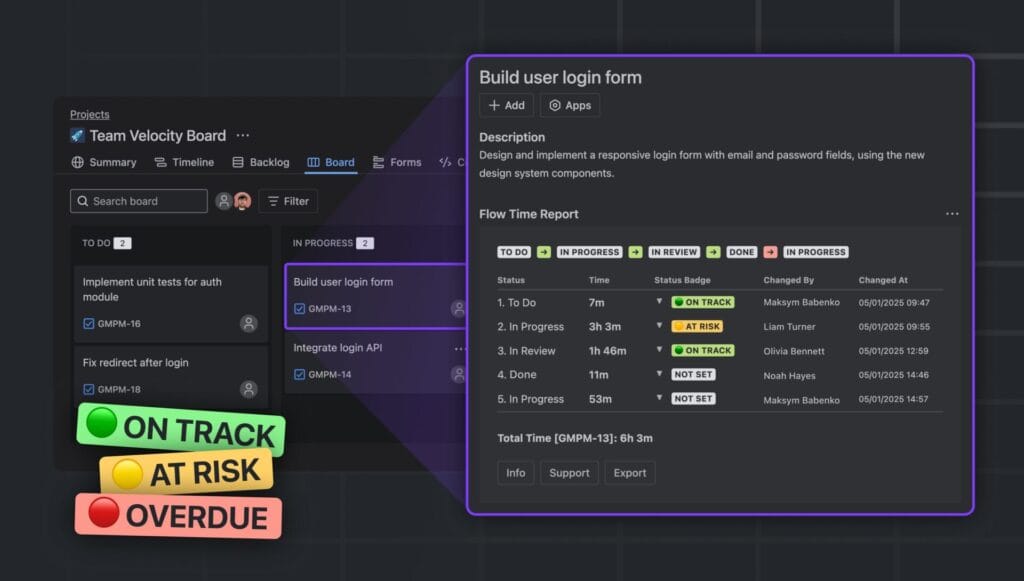
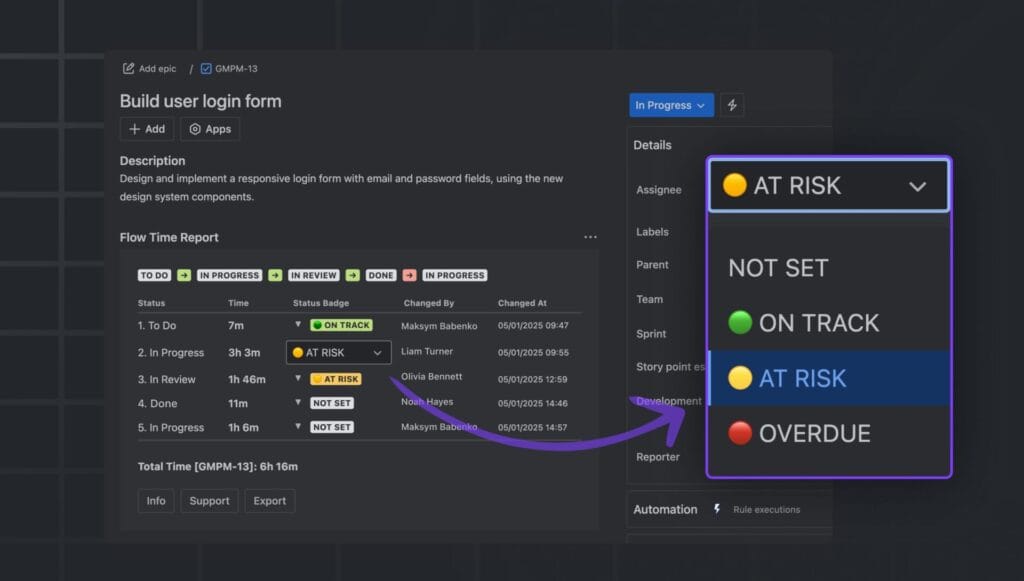
Flow Time Report is a Jira Cloud app that adds this layer directly inside each issue panel — no external dashboards, no spreadsheets, no manual tracking.
For each issue, Flow Time Report displays:
| Data Point | What It Shows |
|---|---|
| Time per status | Exact duration in each workflow stage |
| Transition history | Who moved the issue and when |
| Entry and exit timestamps | Precise start and end time for each status |
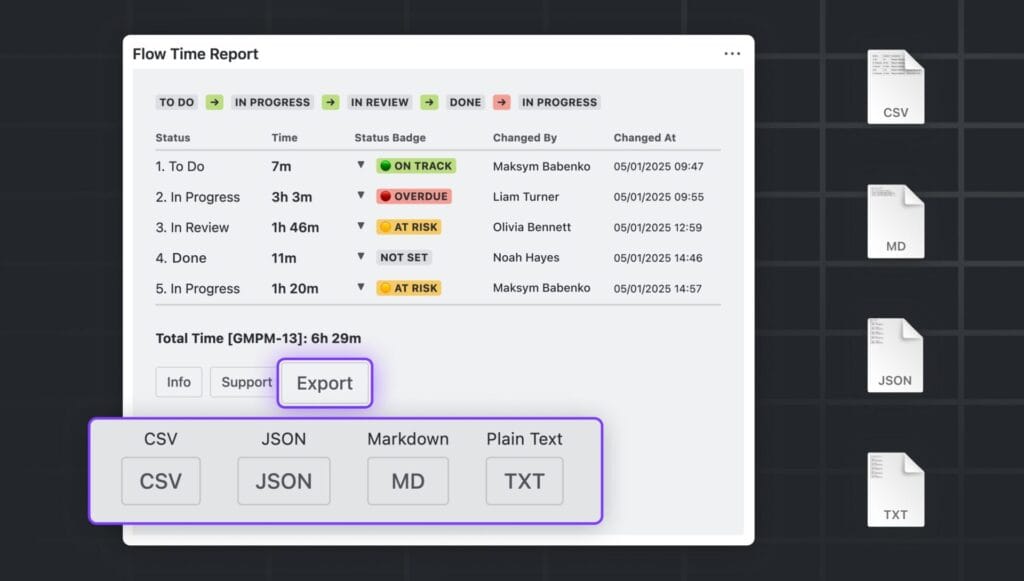
| Export formats | CSV, JSON, Markdown, plain text |
The data lives where the work lives — inside the Jira issue — which means teams use it during standups, planning sessions, and retrospectives without switching tools.
How to Use Time in Status at Every Stage of the Agile Workflow
Sprint Planning
Use historical Time in Status data before committing to sprint scope. If design review consistently takes four days but the team estimates two, the data corrects that assumption before it becomes a problem.
Identify which statuses historically create delays and build appropriate buffer into sprint planning for review, testing, and approval stages.
Daily Standups
Use current status duration as a live prompt during standup. Any issue that has been in the same status for more than two days is a candidate for discussion. The question is not “why is this slow” — it is “what does the team need to unblock this today.”
Retrospectives
Time in Status gives retrospectives specific data instead of general feelings. Rather than discussing “handoffs felt slow this sprint,” teams can identify exactly which handoff, on which day, created the most delay — and design a targeted improvement.
Engineering Manager and Team Lead Reviews
Aggregated Time in Status data across multiple sprints reveals systemic patterns: which stages consistently bottleneck, whether workload is distributed evenly across team members, and whether process changes from previous retrospectives are having measurable impact.
Common Mistakes Teams Make With Time in Status
Time in Status is a powerful metric when used correctly. These are the patterns that reduce its effectiveness.
Tracking total time without status breakdown. Knowing that an issue took twelve days to complete is not actionable. Knowing it spent nine of those twelve days in Ready for Review is.
Using the data to evaluate individual performance. Time in Status measures system behavior, not individual effort. Teams that treat it as a performance metric generate defensive behavior and lose the collaborative insight the data provides.
Manual tracking via spreadsheets. In 2026, manual flow tracking is outdated. It becomes inaccurate within days, requires maintenance effort, and cannot surface real-time signals during the sprint.
Measuring without acting. Time in Status is a conversation starter, not a conclusion. The value comes from the process improvements teams make in response to what the data shows.
Frequently Asked Questions About Time in Status in Jira
What is Time in Status in Jira? Time in Status in Jira measures how long each issue spends in every workflow status before reaching Done. It helps Agile teams identify bottlenecks, handoff delays, and stages where work gets silently stuck.
Does Jira track Time in Status natively? No. Standard Jira does not display how long an issue has been in its current status or how long it spent in previous statuses. Flow Time Report adds this capability directly inside the Jira issue panel for Cloud teams.
What is the difference between cycle time and Time in Status? Cycle time measures the total duration from when active work begins to when it is completed. Time in Status breaks that total into individual stages, showing exactly where within the cycle the time is being spent.
How do you identify bottlenecks using Time in Status? Bottlenecks appear as statuses where issues consistently spend more time than others. If Ready for Review shows an average of four days while In Progress shows one day, the review stage is the bottleneck — regardless of what the team believes intuitively.
Is Time in Status useful for Kanban teams as well as Scrum teams? Yes. For Kanban teams, Time in Status is particularly valuable because it directly supports flow efficiency analysis. It shows where WIP accumulates, which stages create queues, and how changes to work agreements affect throughput over time.
Can Time in Status data be used in retrospectives? Yes, and it significantly improves retrospective quality. Instead of relying on memory and general impressions, teams can review the specific statuses and durations from the sprint and have evidence-based conversations about process improvements.
How is Flow Time Report different from other Time in Status tools for Jira? Flow Time Report displays Time in Status data inside the native Jira issue view — not in a separate dashboard. It includes full transition history with timestamps, supports multiple export formats, and requires no configuration beyond installation. It is free for teams of up to ten users with a thirty-day trial for larger teams.
The Bottom Line
Time in Status is the clearest signal available to Agile teams about where their workflow is breaking down.
In 2026, with faster release cycles, distributed teams, and increasing delivery pressure, the teams that improve consistently are the ones who make flow problems visible before they become sprint failures.
Flow Time Report brings that visibility inside Jira — where the work already lives, where the conversations already happen, and where improvements can be made without adding process overhead.
→ Install Flow Time Report free on Atlassian Marketplace
Read More
[{"id":4680,"link":"https:\/\/typeswitch.net\/blog\/design-tokens-generator\/","name":"design-tokens-generator","thumbnail":{"url":"https:\/\/typeswitch.net\/wp-content\/uploads\/2026\/07\/visualsnag-catch-style-from-website-or-visual-reference.jpg","alt":"catch-style-from-website-or-visual-reference"},"title":"How to Generate Design Tokens From a Website Screenshot","postMeta":[],"author":{"name":"Babenko Maksym","link":"https:\/\/typeswitch.net\/blog\/author\/max-babenko\/"},"date":"\u041b\u0438\u043f 23, 2026","dateGMT":"2026-07-23 08:06:56","modifiedDate":"2026-07-23 08:30:46","modifiedDateGMT":"2026-07-23 08:30:46","commentCount":"0","commentStatus":"closed","categories":{"coma":"<a href=\"https:\/\/typeswitch.net\/blog\/category\/visualsnag\/\" rel=\"category tag\">VisualSnag<\/a>","space":"<a href=\"https:\/\/typeswitch.net\/blog\/category\/visualsnag\/\" rel=\"category tag\">VisualSnag<\/a>"},"taxonomies":{"post_tag":""},"readTime":{"min":6,"sec":34},"status":"publish","content":"Creating a consistent interface is much easier when visual decisions are written down as reusable rules. Those rules are called"},{"id":4524,"link":"https:\/\/typeswitch.net\/blog\/best-language-switcher-macos\/","name":"best-language-switcher-macos","thumbnail":{"url":"https:\/\/typeswitch.net\/wp-content\/uploads\/2024\/11\/Type-Switch-Personalize-Your-Button.png","alt":"Minimalist design of Type Switch app for language changes on macOS."},"title":"Best Language Switcher for macOS in 2026: Type Switch for Multilingual Typing","postMeta":[],"author":{"name":"Babenko Maksym","link":"https:\/\/typeswitch.net\/blog\/author\/max-babenko\/"},"date":"\u0422\u0440\u0430 17, 2026","dateGMT":"2026-05-17 13:47:43","modifiedDate":"2026-05-17 13:56:53","modifiedDateGMT":"2026-05-17 13:56:53","commentCount":"0","commentStatus":"closed","categories":{"coma":"<a href=\"https:\/\/typeswitch.net\/blog\/category\/uncategorized\/\" rel=\"category tag\">Uncategorized<\/a>","space":"<a href=\"https:\/\/typeswitch.net\/blog\/category\/uncategorized\/\" rel=\"category tag\">Uncategorized<\/a>"},"taxonomies":{"post_tag":""},"readTime":{"min":7,"sec":17},"status":"publish","content":"Working with multiple languages on your Mac should feel natural. But for many people, switching keyboard languages is still one"},{"id":4510,"link":"https:\/\/typeswitch.net\/blog\/best-developer-tools-macos-2026\/","name":"best-developer-tools-macos-2026","thumbnail":{"url":"https:\/\/typeswitch.net\/wp-content\/uploads\/2026\/05\/Preview_1_en.jpg","alt":"quick notes app for Mac"},"title":"Best Developer Tools for macOS in 2026: Essential Mac Apps for Coding","postMeta":[],"author":{"name":"Babenko Maksym","link":"https:\/\/typeswitch.net\/blog\/author\/max-babenko\/"},"date":"\u0422\u0440\u0430 17, 2026","dateGMT":"2026-05-17 07:32:59","modifiedDate":"2026-05-17 07:46:13","modifiedDateGMT":"2026-05-17 07:46:13","commentCount":"0","commentStatus":"closed","categories":{"coma":"<a href=\"https:\/\/typeswitch.net\/blog\/category\/uncategorized\/\" rel=\"category tag\">Uncategorized<\/a>","space":"<a href=\"https:\/\/typeswitch.net\/blog\/category\/uncategorized\/\" rel=\"category tag\">Uncategorized<\/a>"},"taxonomies":{"post_tag":""},"readTime":{"min":9,"sec":1},"status":"publish","content":"macOS is still one of the best environments for developers in 2026. You get a Unix-based system, strong hardware, great"},{"id":4402,"link":"https:\/\/typeswitch.net\/blog\/confluence-public-links-alternative\/","name":"confluence-public-links-alternative","thumbnail":{"url":"https:\/\/typeswitch.net\/wp-content\/uploads\/2026\/05\/Confluence-public-links-alternative.png","alt":"Illustration showing Confluence pages published to the public web with Public Pages for Confluence"},"title":"Confluence Public Links Alternative: Publish Pages with SEO, Branding and Custom Domains","postMeta":[],"author":{"name":"Babenko Maksym","link":"https:\/\/typeswitch.net\/blog\/author\/max-babenko\/"},"date":"\u0422\u0440\u0430 8, 2026","dateGMT":"2026-05-08 16:02:11","modifiedDate":"2026-05-08 17:59:18","modifiedDateGMT":"2026-05-08 17:59:18","commentCount":"0","commentStatus":"closed","categories":{"coma":"<a href=\"https:\/\/typeswitch.net\/blog\/category\/atlassian\/\" rel=\"category tag\">Atlassian<\/a>","space":"<a href=\"https:\/\/typeswitch.net\/blog\/category\/atlassian\/\" rel=\"category tag\">Atlassian<\/a>"},"taxonomies":{"post_tag":""},"readTime":{"min":7,"sec":27},"status":"publish","content":"By Maksym Babenko \u00b7 ~5 min read \u00b7 May 8, 2026 Confluence public links are useful when you need to share a page"}]