By Maksym Babenko · ~4 min read · April 30, 2026
Publishing a Confluence page is only the first step.
If you want that page to be found in Google, shared with customers, and used as part of your public documentation, it also needs a proper SEO setup.
Confluence is great for writing and maintaining documentation. Teams use it for setup guides, FAQs, product docs, release notes, policies, and support content. But native Confluence pages are not always ideal for the public web.
A public documentation page needs a clean URL, a clear SEO title, a useful meta description, indexing control, analytics, and ideally your own branded domain.
This guide explains how to set up SEO for public Confluence pages using Public Pages for Confluence.
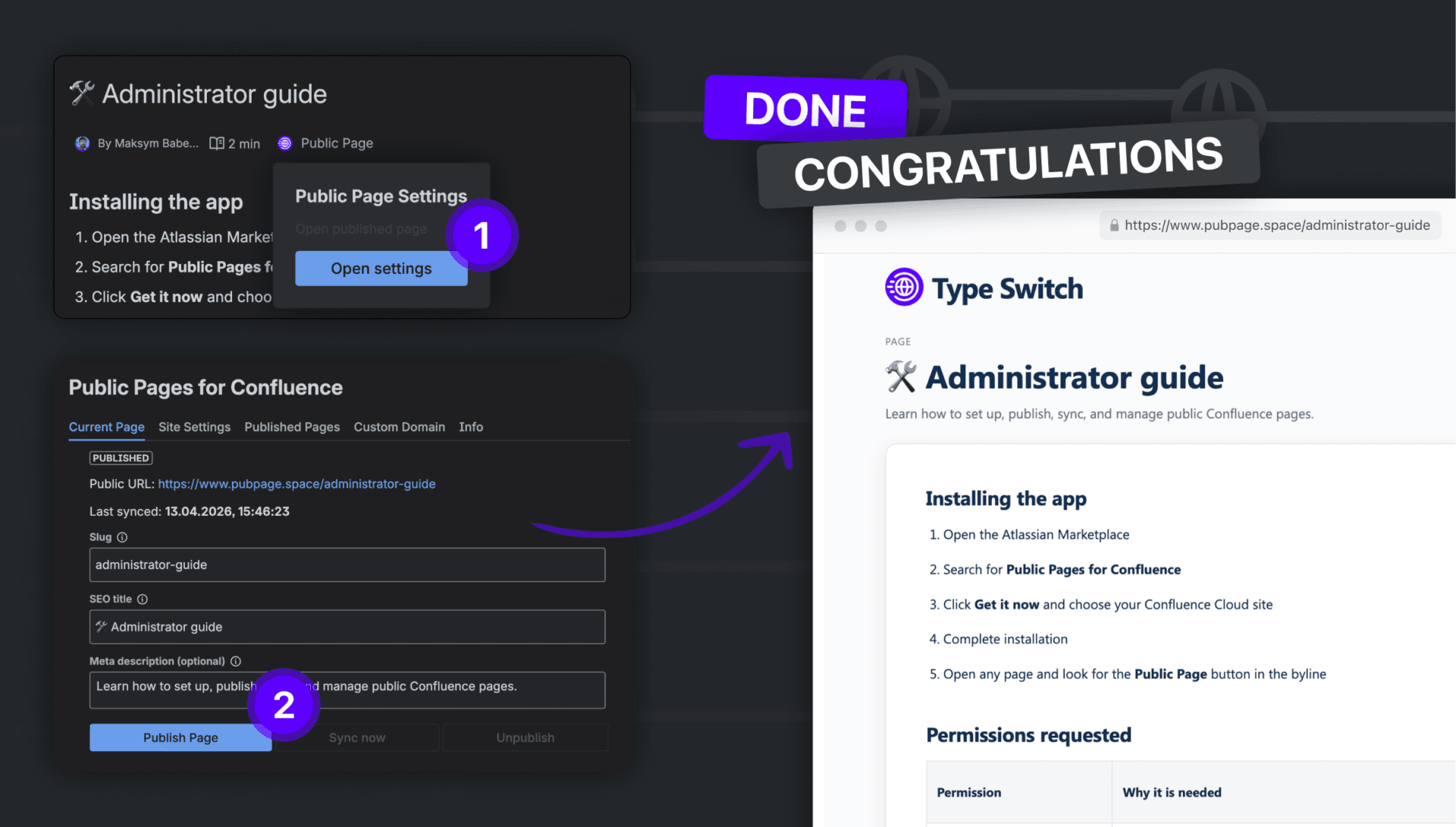
Why public Confluence pages need SEO setup
There is a difference between making a page public and making it ready for search.
A page can be technically accessible, but still difficult for customers to find, understand, or trust.
For example, a native Confluence URL can look long and technical. A public link may be useful for sharing with one person, but it is not the same as a proper SEO page. Anonymous access can make content public, but it may also expose more of the Confluence interface than you want customers to see.
For customer-facing documentation, you usually need something cleaner.
A good public page should:
- live on a readable URL
- have a clear SEO title
- explain itself in a meta description
- be indexable by Google when needed
- look like part of your brand
- let you track traffic and performance
That is the gap Public Pages for Confluence is designed to close.
Start with a clean public URL
The URL is one of the first things users and search engines see.
Instead of sending people to a long Confluence link, use a clean slug that describes the page.
For example: /custom-domain-setup
is much better than: /page-12345-final-version
A good slug should be short, lowercase, and easy to read. It should describe the topic without trying to include every possible keyword.
Good examples:
/google-analytics-setup/public-confluence-pages/custom-domain-for-docs
Avoid slugs that are too long, unclear, or overloaded with keywords.
Add an SEO title
The SEO title is the title that can appear in Google search results. It should tell the reader exactly what the page is about.
A weak title sounds vague: Setup Notes
A better title is specific: How to Set Up a Custom Domain for Public Confluence Pages
The best SEO titles are usually simple. They describe the problem, the action, or the result.
Try to keep the title focused. Do not start every title with your brand name. The topic should come first because that is what people are searching for.
Write a useful meta description
The meta description is the short text that may appear under your title in search results.
It does not need to sound fancy. It needs to help the person decide whether your page is worth opening.
Bad example: “This page contains useful information about our documentation setup.“
Better example: “Learn how to publish Confluence pages with clean URLs, SEO titles, meta descriptions, Google indexing, and custom domain support.“
A strong meta description should answer one simple question: “What will the reader get from this page?“
Keep it clear, specific, and close to the actual content of the page.
Control Google indexing
Not every public page should appear in Google.
Some pages are made for search: setup guides, product documentation, FAQs, troubleshooting articles, release notes, and public policies.
Other pages may be public only because you want to share them with customers or partners. These pages do not always need to be indexed.
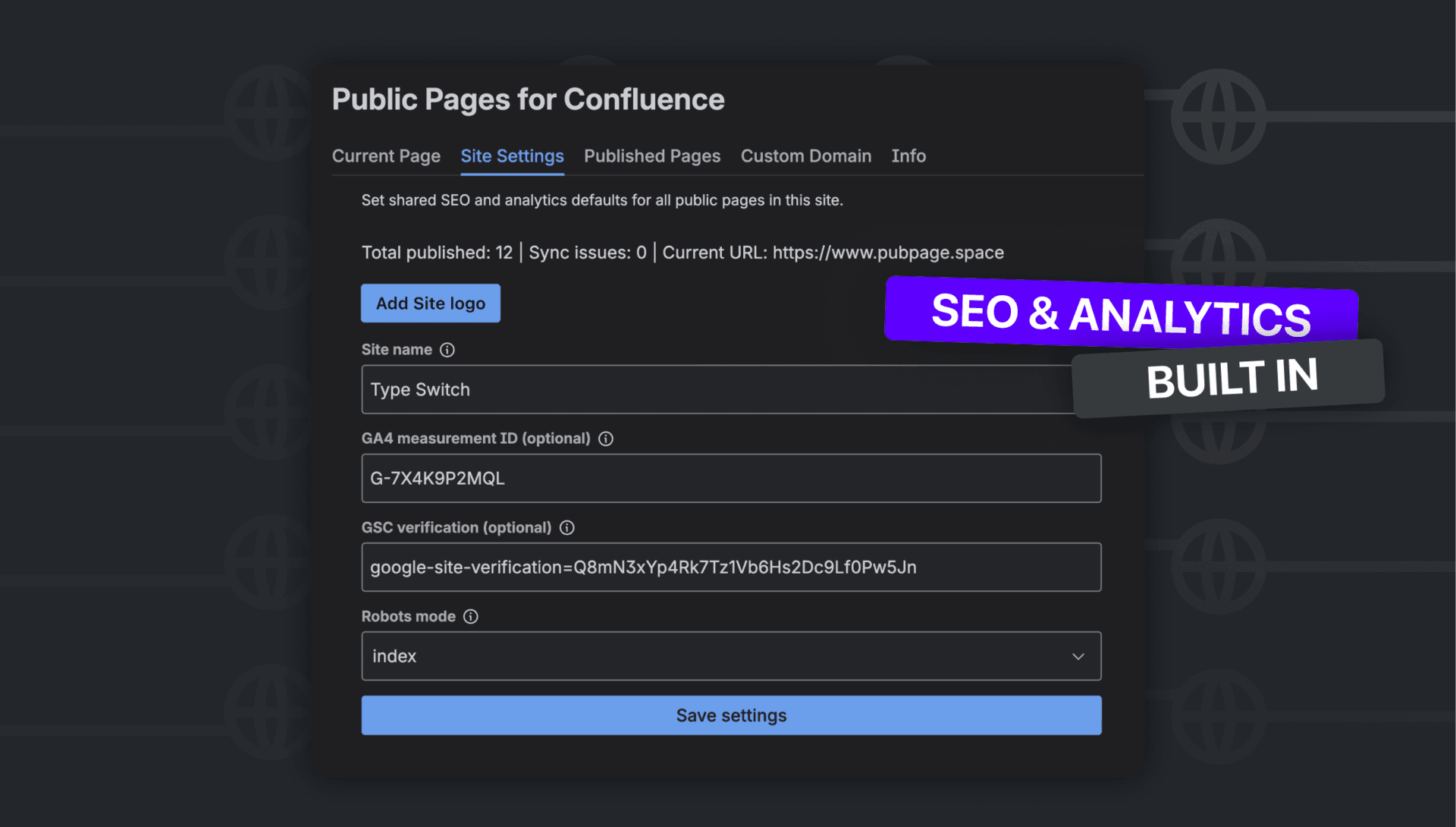
With Public Pages for Confluence, you can control whether public pages should be available for Google indexing.
Use indexing for pages that can attract the right audience from search.
Use noindex for pages that are temporary, private in context, or not useful for organic discovery.
This is especially important when your Confluence content includes both public documentation and pages that were originally written for a smaller audience.
Connect Google Analytics 4
SEO is not only about appearing in search. You also need to understand what happens after people open the page.
Google Analytics 4 helps you see how visitors interact with your public documentation.
In Public Pages for Confluence, you can add your GA4 measurement ID in the site settings. After that, tracking is applied to your published pages automatically.
This helps you understand:
- which pages get traffic
- how people arrive there
- which pages keep visitors engaged
- which documentation pages may need improvement
If a page gets views but people leave quickly, the content may not answer the question clearly enough. If a page gets no traffic, the title, topic, or indexing setup may need work.
Add Google Search Console verification
Google Search Console is one of the most important tools for SEO.
It helps you check whether Google can see your public pages, which queries bring impressions, and whether there are indexing issues.
With Public Pages for Confluence, you can add the Google Search Console verification value in the app settings.
The usual flow is simple:
- Add your public documentation domain in Google Search Console.
- Choose the HTML tag verification method.
- Copy only the verification value.
- Paste it into Public Pages settings.
- Save and verify the property in Google Search Console.
After that, you can inspect your public URLs and request indexing when needed.
Use your own domain when possible
A custom domain makes public documentation feel more trustworthy.
For example: docs.yourcompany.com
looks stronger than a generic shared URL.
This matters for branding, customer trust, and long-term SEO. If people link to your documentation, it is better when that value belongs to your own domain.
Public Pages for Confluence supports custom domains, so you can publish selected Confluence pages as part of your own public documentation experience.
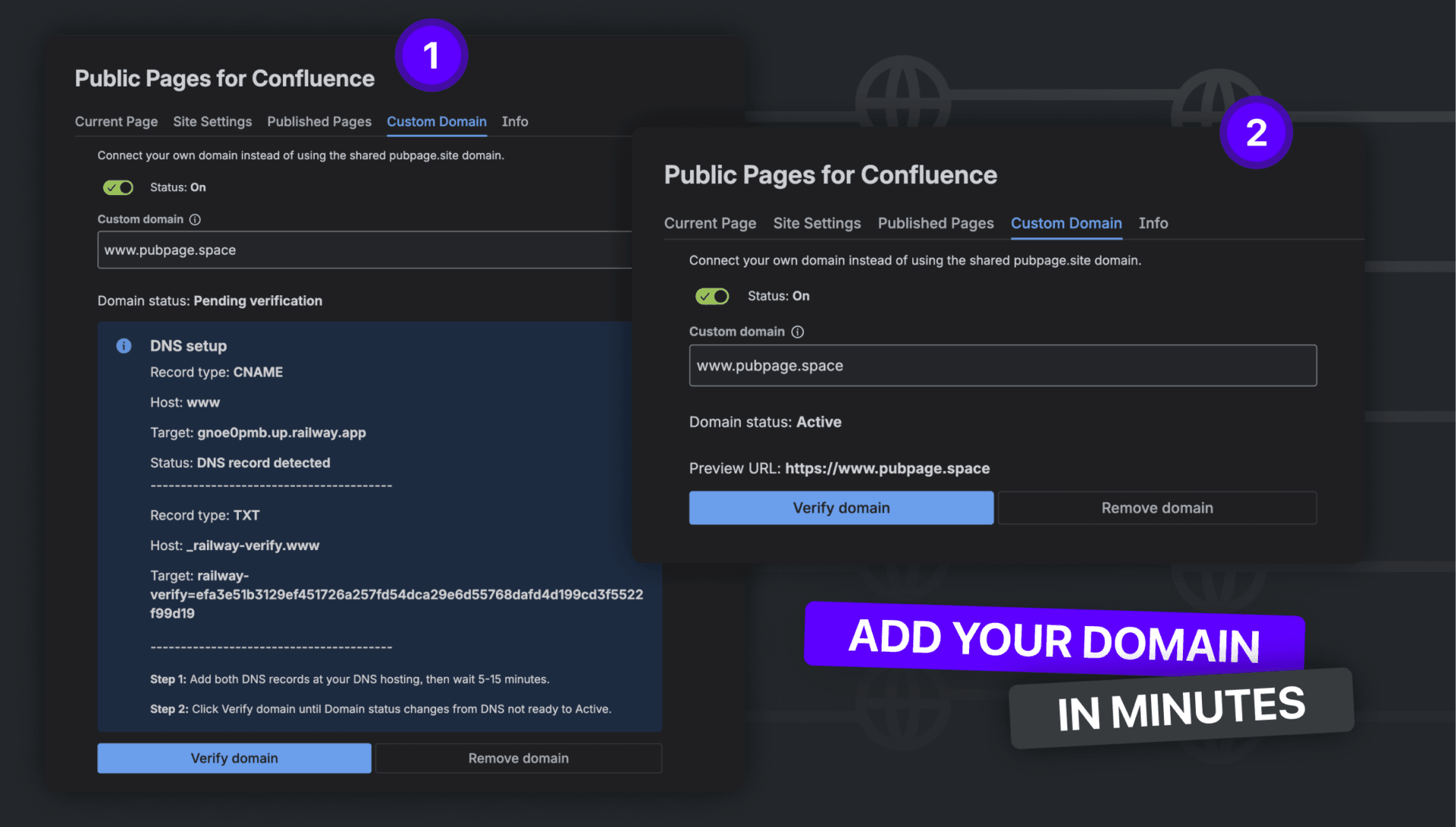
This is useful for:
- customer documentation
- app setup guides
- support pages
- FAQs
- public policies
- release notes
- onboarding materials
Your team can still write and update content in Confluence, while customers see a cleaner public version on your domain.
Common mistakes to avoid
The most common SEO mistake is publishing a page without rewriting it for a public audience.
A Confluence page may make sense internally, but customers need more context. Before publishing, remove internal notes, unclear headings, and anything that should not be public.
Another mistake is using vague titles like “FAQ” or “Setup”. Make the title specific. For example, “How to Set Up Public Pages for Confluence” is much stronger than “Setup”.
Start with a few strong pages that answer real customer questions. It is better to have 10 useful public pages than 50 unclear ones.
Finally, remember to sync updates when the Confluence page changes. If your public page is based on outdated content, it can hurt trust.
Where Public Pages for Confluence helps
Public Pages for Confluence helps you turn selected Confluence pages into public, SEO-friendly pages without moving content to another CMS.
You can keep Confluence as the source of truth and manage the public layer separately.
The app helps with:
- publishing selected Confluence pages
- clean slugs
- SEO titles
- meta descriptions
- Google indexing settings
- Google Analytics 4
- Google Search Console verification
- custom domain support
- site name and logo
- syncing updated pages
This is useful when you do not need a large help center platform, but you do need a simple way to publish professional, branded, searchable documentation from Confluence.
FAQ
A: Yes. You can publish pages without a custom domain, but a custom domain is better for customer-facing documentation. A URL like docs.yourcompany.com looks more professional, builds trust, and keeps your public documentation connected to your brand.
A: No. The public version should be synced when you are ready to publish the updated content. This is useful because you can safely edit and review a Confluence page before pushing the changes live.
A: The best pages to publish are pages that answer real customer questions. Good examples include setup guides, FAQs, troubleshooting articles, product documentation, release notes, onboarding guides, public policies, and app configuration instructions.
A: No. Index pages that can help new users, customers, or prospects discover useful information. Use noindex for temporary pages, customer-specific instructions, draft content, or pages that are public only for direct sharing.
A: Yes. If customers can find clear setup guides, FAQs, and troubleshooting pages on their own, they are less likely to contact support for repeated questions. Public documentation can also help support teams share one clear link instead of rewriting the same answer many times.
Read More
[{"id":4680,"link":"https:\/\/typeswitch.net\/blog\/design-tokens-generator\/","name":"design-tokens-generator","thumbnail":{"url":"https:\/\/typeswitch.net\/wp-content\/uploads\/2026\/07\/visualsnag-catch-style-from-website-or-visual-reference.jpg","alt":"catch-style-from-website-or-visual-reference"},"title":"How to Generate Design Tokens From a Website Screenshot","postMeta":[],"author":{"name":"Babenko Maksym","link":"https:\/\/typeswitch.net\/blog\/author\/max-babenko\/"},"date":"\u041b\u0438\u043f 23, 2026","dateGMT":"2026-07-23 08:06:56","modifiedDate":"2026-07-23 08:30:46","modifiedDateGMT":"2026-07-23 08:30:46","commentCount":"0","commentStatus":"closed","categories":{"coma":"<a href=\"https:\/\/typeswitch.net\/blog\/category\/visualsnag\/\" rel=\"category tag\">VisualSnag<\/a>","space":"<a href=\"https:\/\/typeswitch.net\/blog\/category\/visualsnag\/\" rel=\"category tag\">VisualSnag<\/a>"},"taxonomies":{"post_tag":""},"readTime":{"min":6,"sec":34},"status":"publish","content":"Creating a consistent interface is much easier when visual decisions are written down as reusable rules. Those rules are called"},{"id":4524,"link":"https:\/\/typeswitch.net\/blog\/best-language-switcher-macos\/","name":"best-language-switcher-macos","thumbnail":{"url":"https:\/\/typeswitch.net\/wp-content\/uploads\/2024\/11\/Type-Switch-Personalize-Your-Button.png","alt":"Minimalist design of Type Switch app for language changes on macOS."},"title":"Best Language Switcher for macOS in 2026: Type Switch for Multilingual Typing","postMeta":[],"author":{"name":"Babenko Maksym","link":"https:\/\/typeswitch.net\/blog\/author\/max-babenko\/"},"date":"\u0422\u0440\u0430 17, 2026","dateGMT":"2026-05-17 13:47:43","modifiedDate":"2026-05-17 13:56:53","modifiedDateGMT":"2026-05-17 13:56:53","commentCount":"0","commentStatus":"closed","categories":{"coma":"<a href=\"https:\/\/typeswitch.net\/blog\/category\/uncategorized\/\" rel=\"category tag\">Uncategorized<\/a>","space":"<a href=\"https:\/\/typeswitch.net\/blog\/category\/uncategorized\/\" rel=\"category tag\">Uncategorized<\/a>"},"taxonomies":{"post_tag":""},"readTime":{"min":7,"sec":17},"status":"publish","content":"Working with multiple languages on your Mac should feel natural. But for many people, switching keyboard languages is still one"},{"id":4510,"link":"https:\/\/typeswitch.net\/blog\/best-developer-tools-macos-2026\/","name":"best-developer-tools-macos-2026","thumbnail":{"url":"https:\/\/typeswitch.net\/wp-content\/uploads\/2026\/05\/Preview_1_en.jpg","alt":"quick notes app for Mac"},"title":"Best Developer Tools for macOS in 2026: Essential Mac Apps for Coding","postMeta":[],"author":{"name":"Babenko Maksym","link":"https:\/\/typeswitch.net\/blog\/author\/max-babenko\/"},"date":"\u0422\u0440\u0430 17, 2026","dateGMT":"2026-05-17 07:32:59","modifiedDate":"2026-05-17 07:46:13","modifiedDateGMT":"2026-05-17 07:46:13","commentCount":"0","commentStatus":"closed","categories":{"coma":"<a href=\"https:\/\/typeswitch.net\/blog\/category\/uncategorized\/\" rel=\"category tag\">Uncategorized<\/a>","space":"<a href=\"https:\/\/typeswitch.net\/blog\/category\/uncategorized\/\" rel=\"category tag\">Uncategorized<\/a>"},"taxonomies":{"post_tag":""},"readTime":{"min":9,"sec":1},"status":"publish","content":"macOS is still one of the best environments for developers in 2026. You get a Unix-based system, strong hardware, great"},{"id":4402,"link":"https:\/\/typeswitch.net\/blog\/confluence-public-links-alternative\/","name":"confluence-public-links-alternative","thumbnail":{"url":"https:\/\/typeswitch.net\/wp-content\/uploads\/2026\/05\/Confluence-public-links-alternative.png","alt":"Illustration showing Confluence pages published to the public web with Public Pages for Confluence"},"title":"Confluence Public Links Alternative: Publish Pages with SEO, Branding and Custom Domains","postMeta":[],"author":{"name":"Babenko Maksym","link":"https:\/\/typeswitch.net\/blog\/author\/max-babenko\/"},"date":"\u0422\u0440\u0430 8, 2026","dateGMT":"2026-05-08 16:02:11","modifiedDate":"2026-05-08 17:59:18","modifiedDateGMT":"2026-05-08 17:59:18","commentCount":"0","commentStatus":"closed","categories":{"coma":"<a href=\"https:\/\/typeswitch.net\/blog\/category\/atlassian\/\" rel=\"category tag\">Atlassian<\/a>","space":"<a href=\"https:\/\/typeswitch.net\/blog\/category\/atlassian\/\" rel=\"category tag\">Atlassian<\/a>"},"taxonomies":{"post_tag":""},"readTime":{"min":7,"sec":27},"status":"publish","content":"By Maksym Babenko \u00b7 ~5 min read \u00b7 May 8, 2026 Confluence public links are useful when you need to share a page"}]