By Maksym Babenko · ~5 min read · May 8, 2026
Confluence public links are useful when you need to share a page with someone outside your organization.
You create a public link, copy the URL, and send it to a customer, partner, contractor, or stakeholder. For simple external sharing, this can work well.
But public links are not always enough.
If you want your Confluence content to work as public documentation, rank in Google, live on your own domain, look like part of your brand, and support analytics, you may need a more complete publishing setup.
That is where a Confluence public links alternative can help.
In this article, we’ll look at when public links are enough, where they fall short, and how to publish Confluence pages as SEO-friendly public pages.
What Confluence public links are good for
Public links are designed for simple external sharing.
They are helpful when you need to:
- share one page with a customer
- send a draft to an external reviewer
- give a partner access to specific instructions
- share a temporary update
- make a page visible without creating a user account
For these cases, public links are convenient. The page stays in Confluence, and the external person can open it through the public URL.
So the problem is not that Confluence public links are bad. They solve a real need.
The problem is that they are built for sharing, not for publishing.
Sharing is not the same as publishing
When you share a page, your main goal is access. You want a specific person to open a specific page.
When you publish a page, the goal is different. You want that page to become part of your public web presence.
A published page should be:
- easy to find
- easy to trust
- connected to your brand
- indexable when needed
- measurable through analytics
- hosted on a clean, recognizable URL
This is where native Confluence public links can become limited.
They can make a page accessible, but accessibility alone does not create a proper public documentation page.
If you are publishing product guides, release notes, help articles, onboarding pages, public FAQs, or setup instructions, you usually need more than a shared link. You need a public page that behaves like part of your website.
Where Confluence public links fall short
1. Limited SEO control
Public links are not designed as SEO pages.
If you want content to appear in search, you usually need more control over the page title, meta description, URL, indexing settings, and page structure.
That matters because public documentation can attract people who are already searching for help, setup instructions, product information, or integration guides.
2. No clean branded URL
A public link still feels like a Confluence link.
For customer-facing documentation, a URL like this feels more professional:
docs.yourcompany.com/setup-guide or: help.yourcompany.com/getting-started
A custom domain makes documentation feel like part of your product, not like an internal page exposed to the outside world.
3. Limited analytics
If your documentation is public, you probably want to know how it performs.
For example:
- which pages get traffic
- which guides people open most often
- whether visitors come from search
- which topics support onboarding or sales
For that, you need analytics tools such as Google Analytics 4 and Google Search Console.
Public links are mainly about access. They are not a full analytics-friendly publishing layer.
4. Not ideal for public documentation
Public links are useful for one-off sharing.
But if you want to publish multiple public pages, organize them, optimize them for search, and connect them to your brand, public links quickly become limited.
This is especially true for:
- product documentation
- help articles
- release notes
- customer onboarding pages
- public FAQs
- Atlassian Marketplace app documentation
- public knowledge base content
Confluence public links vs Public Pages for Confluence
| Need | Confluence public links | Public Pages for Confluence |
|---|---|---|
| Share a page externally | Yes | Yes |
| Publish selected Confluence pages publicly | Limited | Yes |
| SEO title and meta description | Limited | Yes |
| Clean public URL | Limited | Yes |
| Custom domain | Limited for this use case | Yes |
| Branded public experience | Limited | Yes |
| Google Analytics 4 | No | Yes |
| Google Search Console verification | No | Yes |
| Best for | Quick sharing | SEO-friendly public pages |
The difference is simple. Confluence public links help you share a page.
Public Pages for Confluence helps you publish selected Confluence pages as public web pages with SEO, branding, analytics, and custom domain support.
When native public links are enough
You probably do not need an alternative if your use case is simple.
Public links may be enough if:
- you only need to share one page
- the page is temporary
- SEO does not matter
- branding does not matter
- custom domain does not matter
- analytics do not matter
- the recipient already expects a Confluence link
For example, if you need to send one instruction page to a contractor or share a temporary update with a partner, native public links can work well.
When you need a Confluence public links alternative
You may need an alternative when the page is not just being shared, but published. That usually means the page has a longer-term public role.
You should consider an alternative if you want to:
- make pages indexable by Google
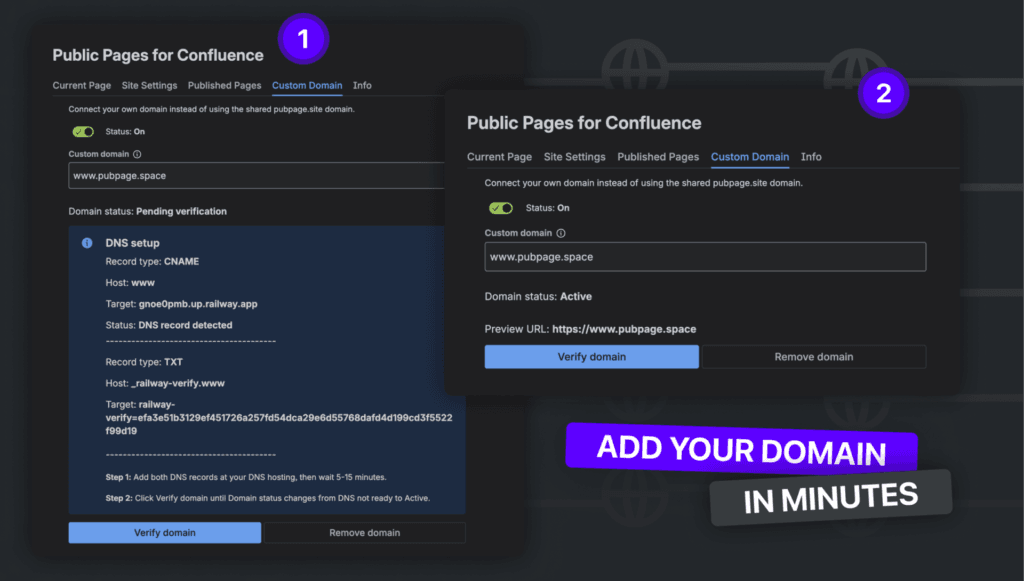
- use your own domain
- create clean public URLs
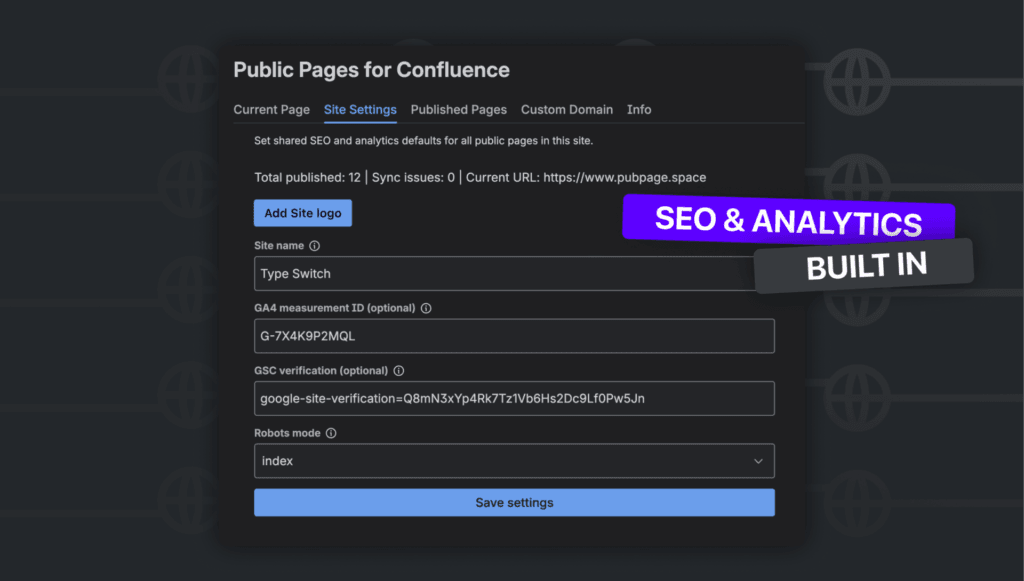
- add SEO titles and meta descriptions
- track visits with analytics
- publish customer-facing documentation
- turn Confluence content into a public knowledge base
- avoid copying content into WordPress, Webflow, GitBook, or another CMS
This is a common situation for teams that already maintain content in Confluence. The content is already there. The missing part is a better public version.
How Public Pages for Confluence works
Public Pages for Confluence lets teams publish selected Confluence pages as SEO-friendly public pages.
The workflow is simple:
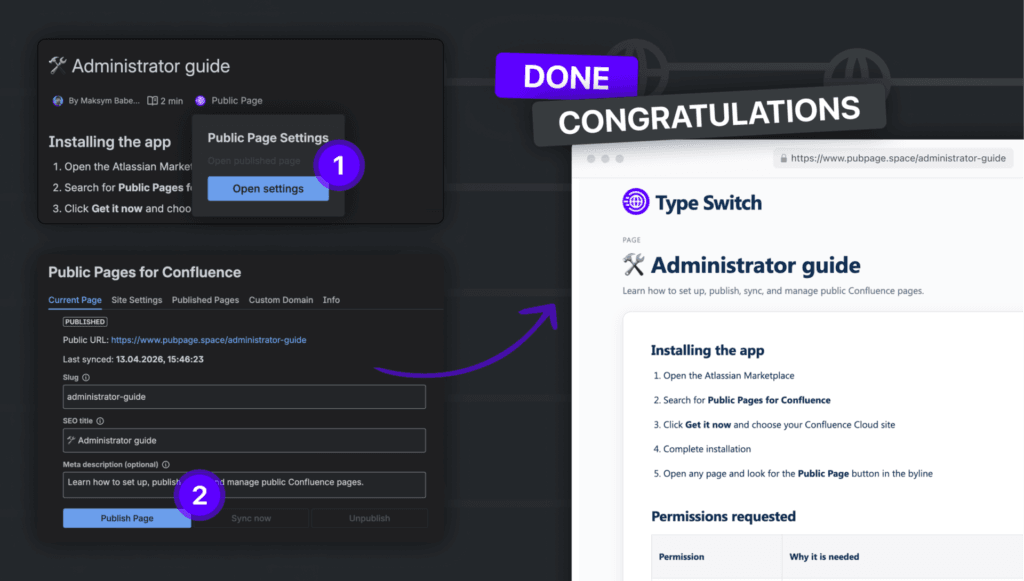
- Open the Confluence page you want to publish.
- Set a public slug.
- Add an SEO title and meta description.
- Choose indexing settings.
- Publish the page.
- Optionally connect a custom domain and analytics.
You can use it for product documentation, help articles, release notes, public FAQs, setup guides, onboarding pages, and Atlassian Marketplace app documentation.
The content stays in Confluence, but the public version becomes cleaner, more searchable, and more customer-friendly.
Why custom domains matter
A custom domain makes your public documentation feel more trustworthy.
For example: docs.yourcompany.com
looks better than a long technical URL. It is easier to share, easier to remember, and more connected to your brand.
For SaaS companies, product teams, support teams, and Atlassian Marketplace vendors, this can make documentation feel like part of the product experience, not a separate internal tool.
Why SEO matters for public Confluence pages
Documentation is often treated as support content. But public documentation can also support growth.
A good help article can answer a customer question before they contact support.
A setup guide can help users activate faster.
A product guide can help potential buyers understand your product.
A release note can show that your product is active and improving.
If these pages are public and optimized for search, they can bring qualified visitors over time.
That is why SEO matters. Useful documentation should not only help existing users. It can also help new users discover your product.
Conclusion
Confluence public links are useful for quick external sharing. But if you want to publish customer-facing documentation, they are often not enough.
A proper public page needs more than access. It needs a clean URL, SEO metadata, indexing control, analytics, branding, and ideally a custom domain. If you only need to send a page to someone, native public links are fine.
If you want selected Confluence pages to work as part of your public website, Public Pages for Confluence gives you a lighter way to publish them without moving content to another CMS.
Your documentation can stay in Confluence, but live on the public web like a proper part of your product.
FAQ
It depends on your use case. If you need a full documentation portal or intranet, tools like Scroll Sites or Refined may be a better fit. If you want to publish selected Confluence pages as SEO-friendly public pages, Public Pages for Confluence is built for that.
Public links are mainly designed for sharing. If SEO matters, you usually need clean URLs, SEO titles, meta descriptions, indexing controls, sitemap support, and analytics.
Yes. With Public Pages for Confluence, you can publish selected Confluence pages on a custom domain, such as docs.yourcompany.com or help.yourcompany.com.
Use native public links when you only need to share one page externally and do not care about SEO, branding, analytics, or custom domains.
Use it when you want selected Confluence pages to become public, SEO-friendly web pages for documentation, release notes, setup guides, help articles, onboarding pages, or public FAQs.
Read More
[{"id":4680,"link":"https:\/\/typeswitch.net\/blog\/design-tokens-generator\/","name":"design-tokens-generator","thumbnail":{"url":"https:\/\/typeswitch.net\/wp-content\/uploads\/2026\/07\/visualsnag-catch-style-from-website-or-visual-reference.jpg","alt":"catch-style-from-website-or-visual-reference"},"title":"How to Generate Design Tokens From a Website Screenshot","postMeta":[],"author":{"name":"Babenko Maksym","link":"https:\/\/typeswitch.net\/blog\/author\/max-babenko\/"},"date":"\u041b\u0438\u043f 23, 2026","dateGMT":"2026-07-23 08:06:56","modifiedDate":"2026-07-23 08:30:46","modifiedDateGMT":"2026-07-23 08:30:46","commentCount":"0","commentStatus":"closed","categories":{"coma":"<a href=\"https:\/\/typeswitch.net\/blog\/category\/visualsnag\/\" rel=\"category tag\">VisualSnag<\/a>","space":"<a href=\"https:\/\/typeswitch.net\/blog\/category\/visualsnag\/\" rel=\"category tag\">VisualSnag<\/a>"},"taxonomies":{"post_tag":""},"readTime":{"min":6,"sec":34},"status":"publish","content":"Creating a consistent interface is much easier when visual decisions are written down as reusable rules. Those rules are called"},{"id":4524,"link":"https:\/\/typeswitch.net\/blog\/best-language-switcher-macos\/","name":"best-language-switcher-macos","thumbnail":{"url":"https:\/\/typeswitch.net\/wp-content\/uploads\/2024\/11\/Type-Switch-Personalize-Your-Button.png","alt":"Minimalist design of Type Switch app for language changes on macOS."},"title":"Best Language Switcher for macOS in 2026: Type Switch for Multilingual Typing","postMeta":[],"author":{"name":"Babenko Maksym","link":"https:\/\/typeswitch.net\/blog\/author\/max-babenko\/"},"date":"\u0422\u0440\u0430 17, 2026","dateGMT":"2026-05-17 13:47:43","modifiedDate":"2026-05-17 13:56:53","modifiedDateGMT":"2026-05-17 13:56:53","commentCount":"0","commentStatus":"closed","categories":{"coma":"<a href=\"https:\/\/typeswitch.net\/blog\/category\/uncategorized\/\" rel=\"category tag\">Uncategorized<\/a>","space":"<a href=\"https:\/\/typeswitch.net\/blog\/category\/uncategorized\/\" rel=\"category tag\">Uncategorized<\/a>"},"taxonomies":{"post_tag":""},"readTime":{"min":7,"sec":17},"status":"publish","content":"Working with multiple languages on your Mac should feel natural. But for many people, switching keyboard languages is still one"},{"id":4510,"link":"https:\/\/typeswitch.net\/blog\/best-developer-tools-macos-2026\/","name":"best-developer-tools-macos-2026","thumbnail":{"url":"https:\/\/typeswitch.net\/wp-content\/uploads\/2026\/05\/Preview_1_en.jpg","alt":"quick notes app for Mac"},"title":"Best Developer Tools for macOS in 2026: Essential Mac Apps for Coding","postMeta":[],"author":{"name":"Babenko Maksym","link":"https:\/\/typeswitch.net\/blog\/author\/max-babenko\/"},"date":"\u0422\u0440\u0430 17, 2026","dateGMT":"2026-05-17 07:32:59","modifiedDate":"2026-05-17 07:46:13","modifiedDateGMT":"2026-05-17 07:46:13","commentCount":"0","commentStatus":"closed","categories":{"coma":"<a href=\"https:\/\/typeswitch.net\/blog\/category\/uncategorized\/\" rel=\"category tag\">Uncategorized<\/a>","space":"<a href=\"https:\/\/typeswitch.net\/blog\/category\/uncategorized\/\" rel=\"category tag\">Uncategorized<\/a>"},"taxonomies":{"post_tag":""},"readTime":{"min":9,"sec":1},"status":"publish","content":"macOS is still one of the best environments for developers in 2026. You get a Unix-based system, strong hardware, great"},{"id":4402,"link":"https:\/\/typeswitch.net\/blog\/confluence-public-links-alternative\/","name":"confluence-public-links-alternative","thumbnail":{"url":"https:\/\/typeswitch.net\/wp-content\/uploads\/2026\/05\/Confluence-public-links-alternative.png","alt":"Illustration showing Confluence pages published to the public web with Public Pages for Confluence"},"title":"Confluence Public Links Alternative: Publish Pages with SEO, Branding and Custom Domains","postMeta":[],"author":{"name":"Babenko Maksym","link":"https:\/\/typeswitch.net\/blog\/author\/max-babenko\/"},"date":"\u0422\u0440\u0430 8, 2026","dateGMT":"2026-05-08 16:02:11","modifiedDate":"2026-05-08 17:59:18","modifiedDateGMT":"2026-05-08 17:59:18","commentCount":"0","commentStatus":"closed","categories":{"coma":"<a href=\"https:\/\/typeswitch.net\/blog\/category\/atlassian\/\" rel=\"category tag\">Atlassian<\/a>","space":"<a href=\"https:\/\/typeswitch.net\/blog\/category\/atlassian\/\" rel=\"category tag\">Atlassian<\/a>"},"taxonomies":{"post_tag":""},"readTime":{"min":7,"sec":27},"status":"publish","content":"By Maksym Babenko \u00b7 ~5 min read \u00b7 May 8, 2026 Confluence public links are useful when you need to share a page"}]