Lightweight, contextual risk scoring that lives where your work happens.

🚨 Why Risk Management in Jira Matters
In fast-moving Agile teams, effective risk management isn’t a luxury — it’s essential.
Yet many teams still manage risks outside Jira: in spreadsheets, Confluence tables, or third-party systems.
This leads to:
- Outdated risk data
- Disconnected workflows
- Risks forgotten mid-sprint
- No clear link between work and risk impact
❌ Result: Teams are surprised by blockers, complexity, or dependencies — too late to react.
💡 There’s a Better Way
Risk Radar brings risk awareness directly into your Jira issues — where your team already works.
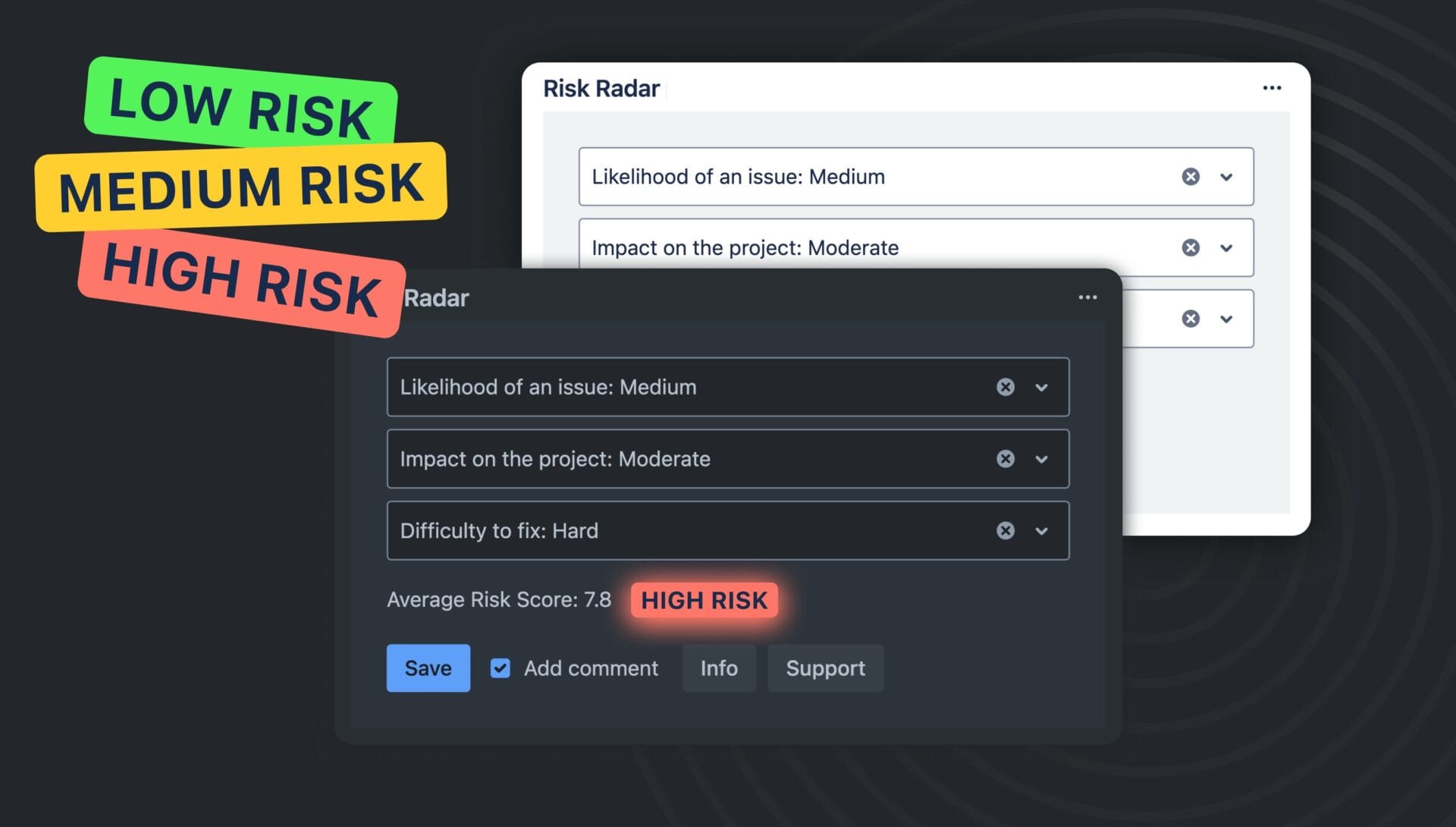
With just a few clicks, you can assess the Likelihood, Impact, and Difficulty of each task — and instantly calculate a Risk Score that’s visible to the whole team.
How Risk Radar Works
- Open any Jira issue
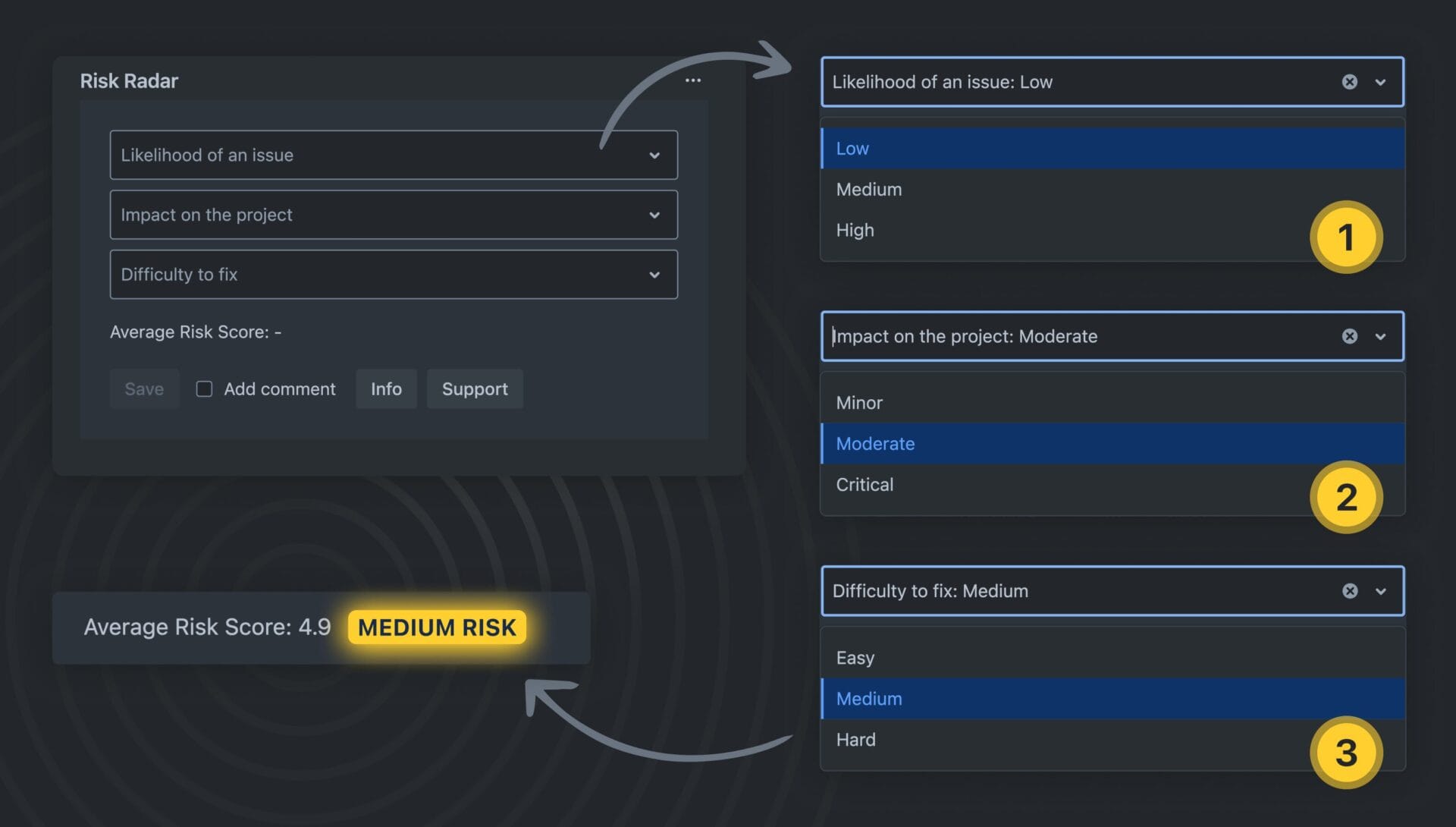
- Select values for:
- ✅ Probability of failure
- ✅ Business impact
- ✅ Resolution difficulty
- Let Risk Radar calculate the score (1–10) using our smart weighted formula
- Visual indicator shows the level:
- 🟢 Low Risk
- 🟡 Medium Risk
- 🔴 High Risk
- The score is saved inside the issue (via properties), always up to date
🧠 Benefits of Risk Assessment Inside Jira
✅ Spot risks early — not after the sprint starts
Assess risks during backlog grooming or issue creation to flag critical items early.
✅ Prioritize with clarity
Split or defer tasks with high risk. Assign extra review time or more experienced team members.
✅ Align the whole team
When risk is visible in the issue view, everyone — from devs to QA to PMs — can make informed decisions.
✅ Keep it lightweight
No spreadsheets, no external tools, no context-switching. Just fast, in-flow insights.
Real-World Use Cases
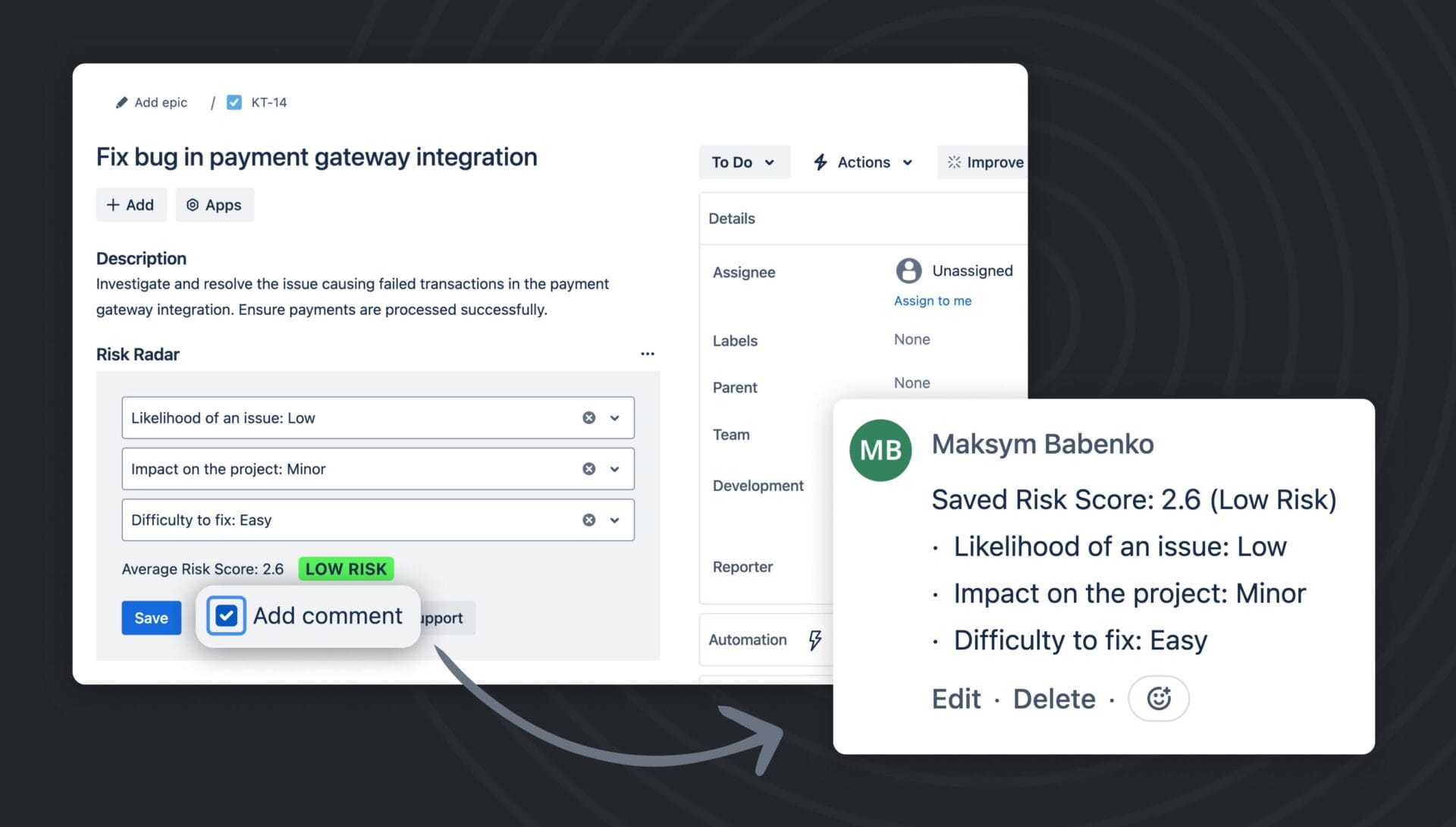
Use Case #1: Risk-Aware Sprint Planning
During sprint planning, your team identifies an issue integrating with a third-party payment API.
The Risk Radar score is 8.9 (High Risk) due to unstable API docs and high business impact.
📌 Action taken:
- Task is broken into smaller spikes
- Added QA fallback plan
- Assigned to senior developer
- Flagged for extra stakeholder check-in
🎯 Result: No sprint delay. Mitigation was planned from day one.
Use Case #2: Reducing Last-Minute Blockers
In a previous sprint, two tasks sat in “Blocked” for 4 days — unnoticed.
In the retro, Risk Radar showed both had been scored High Risk but no one monitored them.
📌 Action taken:
- Created dashboard with high-risk issues
- Added Slack notifications when risk score ≥ 7
- Used risk score as a filter in standups
🎯 Result: Blockers flagged earlier. Fewer surprises. Team stress dropped.
Use Case #3: Managing Tech Debt with Risk Score
You’ve got several “refactor later” tickets. Normally low-priority — but Risk Radar shows some carry a Risk Score of 7.2 due to high failure impact.
📌 Action taken:
- Re-prioritized during grooming
- Added spike to explore one task more deeply
- Converted risky task into epic for gradual cleanup
🎯 Result: Team cleaned up dangerous tech debt before it caused production issues.
Who Uses Risk Radar?
Risk Radar is designed for:
- Agile, Scrum, and Kanban teams
- DevOps and Platform teams managing technical complexity
- QA and Testing teams wanting to assess delivery risk
- Product managers and delivery leads needing visibility without bureaucracy
Start in Under 2 Minutes
- No setup required
- Works out-of-the-box inside any Jira issue
- Risk Score saved with the issue
- Visible, consistent, and always up to date
🛠️ Built with Atlassian Forge → secure, fast, and natively integrated.
How to Use It in Your Workflow
📌 Backlog Grooming:
Tag risky tasks immediately and decide whether to split, defer, or mitigate.
📌 Sprint Planning:
Use risk score to assign ownership, prioritize sequence, or estimate complexity.
📌 Daily Standups:
Watch for high-risk issues that remain untouched. Reassign or unblock fast.
📌 Retrospectives:
Review which risks materialized — what you predicted correctly and what surprised you.
Why Teams Love Risk Radar
✅ Clear visual signals inside each issue
✅ Instant risk assessment in under 10 seconds
✅ No spreadsheets, Confluence tables, or tools to update
✅ Promotes proactive delivery without micromanagement
✨ Bonus: Smart Formula, Not Just Labels
Our risk model isn’t based on vague “High/Low” dropdowns — it uses:
- Weighted scoring
- Adjustments based on impact/difficulty combos
- Normalization to a 1–10 scale
🎯 Real insight, not guesswork.
Ready to Embed Risk Management Into Your Delivery Flow?
Try Risk Radar for Jira Cloud — free for small teams (up to 10 users) and with a 30-day trial for everyone else.
👉 Free on Atlassian Marketplace
👉 Contact us for feedback or feature requests
Read More
[{"id":4024,"link":"https:\/\/typeswitch.net\/blog\/best-jira-apps-agile-teams-2026\/","name":"best-jira-apps-agile-teams-2026","thumbnail":{"url":"https:\/\/typeswitch.net\/wp-content\/uploads\/2026\/02\/best-jira-apps-2026-8fc0c8.svg","alt":""},"title":"The Best Jira Apps Every Agile Team Needs in 2026: Sprint Health, Risk, Flow Metrics & Prioritization.","postMeta":[],"author":{"name":"meltedmensoftware@gmail.com","link":"https:\/\/typeswitch.net\/blog\/author\/meltedmensoftwaregmail-com\/"},"date":"\u041b\u044e\u0442 25, 2026","dateGMT":"2026-02-25 08:30:06","modifiedDate":"2026-02-25 08:45:52","modifiedDateGMT":"2026-02-25 08:45:52","commentCount":"0","commentStatus":"closed","categories":{"coma":"<a href=\"https:\/\/typeswitch.net\/blog\/category\/atlassian\/\" rel=\"category tag\">Atlassian<\/a>, <a href=\"https:\/\/typeswitch.net\/blog\/category\/atlassian\/jira-app\/\" rel=\"category tag\">Jira App<\/a>","space":"<a href=\"https:\/\/typeswitch.net\/blog\/category\/atlassian\/\" rel=\"category tag\">Atlassian<\/a> <a href=\"https:\/\/typeswitch.net\/blog\/category\/atlassian\/jira-app\/\" rel=\"category tag\">Jira App<\/a>"},"taxonomies":{"post_tag":""},"readTime":{"min":8,"sec":38},"status":"publish","content":"Every Jira team has a version of this story. The sprint ends. The retrospective starts. Someone pulls up the board"},{"id":4007,"link":"https:\/\/typeswitch.net\/blog\/time-in-status-jira-2026\/","name":"time-in-status-jira-2026","thumbnail":{"url":"https:\/\/typeswitch.net\/wp-content\/uploads\/2026\/02\/Time-in-Status-for-Jira.jpg","alt":""},"title":"Time in Status in Jira: How Agile Teams Find Bottlenecks and Ship Faster (2026 Guide)","postMeta":[],"author":{"name":"meltedmensoftware@gmail.com","link":"https:\/\/typeswitch.net\/blog\/author\/meltedmensoftwaregmail-com\/"},"date":"\u041b\u044e\u0442 22, 2026","dateGMT":"2026-02-22 07:47:20","modifiedDate":"2026-02-22 11:20:53","modifiedDateGMT":"2026-02-22 11:20:53","commentCount":"0","commentStatus":"closed","categories":{"coma":"<a href=\"https:\/\/typeswitch.net\/blog\/category\/atlassian\/\" rel=\"category tag\">Atlassian<\/a>, <a href=\"https:\/\/typeswitch.net\/blog\/category\/atlassian\/jira-app\/\" rel=\"category tag\">Jira App<\/a>","space":"<a href=\"https:\/\/typeswitch.net\/blog\/category\/atlassian\/\" rel=\"category tag\">Atlassian<\/a> <a href=\"https:\/\/typeswitch.net\/blog\/category\/atlassian\/jira-app\/\" rel=\"category tag\">Jira App<\/a>"},"taxonomies":{"post_tag":""},"readTime":{"min":6,"sec":57},"status":"publish","content":"Time in Status in Jira is a workflow metric that measures how long each issue spends in every status \u2014"},{"id":3995,"link":"https:\/\/typeswitch.net\/blog\/risk-management-in-jira-2026\/","name":"risk-management-in-jira-2026","thumbnail":{"url":"https:\/\/typeswitch.net\/wp-content\/uploads\/2026\/02\/Risk-Management-for-Jira.jpg","alt":""},"title":"Risk Management in Jira: How Agile Teams Detect Problems Before They Happen (2026 Guide)","postMeta":[],"author":{"name":"meltedmensoftware@gmail.com","link":"https:\/\/typeswitch.net\/blog\/author\/meltedmensoftwaregmail-com\/"},"date":"\u041b\u044e\u0442 21, 2026","dateGMT":"2026-02-21 08:05:47","modifiedDate":"2026-02-22 11:21:20","modifiedDateGMT":"2026-02-22 11:21:20","commentCount":"0","commentStatus":"closed","categories":{"coma":"<a href=\"https:\/\/typeswitch.net\/blog\/category\/atlassian\/\" rel=\"category tag\">Atlassian<\/a>, <a href=\"https:\/\/typeswitch.net\/blog\/category\/atlassian\/jira-app\/\" rel=\"category tag\">Jira App<\/a>","space":"<a href=\"https:\/\/typeswitch.net\/blog\/category\/atlassian\/\" rel=\"category tag\">Atlassian<\/a> <a href=\"https:\/\/typeswitch.net\/blog\/category\/atlassian\/jira-app\/\" rel=\"category tag\">Jira App<\/a>"},"taxonomies":{"post_tag":""},"readTime":{"min":5,"sec":38},"status":"publish","content":"Risk management in Jira is the practice of identifying, scoring, and tracking potential delivery problems directly inside Jira issues, before"},{"id":3372,"link":"https:\/\/typeswitch.net\/blog\/ice-in-jira-impact-confidence-effort-fast-prioritization-using-dynamic-scoring\/","name":"ice-in-jira-impact-confidence-effort-fast-prioritization-using-dynamic-scoring","thumbnail":{"url":"https:\/\/typeswitch.net\/wp-content\/uploads\/2025\/12\/ICE.jpg","alt":""},"title":"ICE in Jira (Impact, Confidence, Effort): Fast Prioritization Using Dynamic Scoring","postMeta":[],"author":{"name":"meltedmensoftware@gmail.com","link":"https:\/\/typeswitch.net\/blog\/author\/meltedmensoftwaregmail-com\/"},"date":"\u0413\u0440\u0443 2, 2025","dateGMT":"2025-12-02 13:08:51","modifiedDate":"2025-12-12 08:30:02","modifiedDateGMT":"2025-12-12 08:30:02","commentCount":"0","commentStatus":"closed","categories":{"coma":"<a href=\"https:\/\/typeswitch.net\/blog\/category\/atlassian\/jira-app\/\" rel=\"category tag\">Jira App<\/a>","space":"<a href=\"https:\/\/typeswitch.net\/blog\/category\/atlassian\/jira-app\/\" rel=\"category tag\">Jira App<\/a>"},"taxonomies":{"post_tag":""},"readTime":{"min":1,"sec":42},"status":"publish","content":"How to Calculate ICE Scores in Jira for Fast, Lightweight Prioritization The ICE framework (Impact, Confidence, Effort) is a simple"}]