How to Implement WSJF in Jira for Agile, Flow-Driven Prioritization Using Dynamic Scoring
Weighted Shortest Job First (WSJF) is one of the most effective methods for prioritizing work in Lean and SAFe organizations. It helps teams choose work that maximizes value delivery while minimizing delays. The challenge? Jira does not offer native WSJF scoring, so teams often rely on spreadsheets, manual updates, and inconsistent calculations.
Dynamic Scoring for Jira eliminates this by allowing you to calculate WSJF directly inside the Jira issue view fully configurable, always up-to-date, and visible to the entire team.
Why WSJF Has Become a Standard in Agile & Lean Product Development
WSJF comes from the Scaled Agile Framework (SAFe) and uses the following principle:
WSJF = Cost of Delay ÷ Job Size
Cost of Delay captures urgency + value + time sensitivity; Job Size represents the delivery effort.
Teams gravitate toward WSJF because it:
1. Maximizes the flow of value
WSJF helps sequence work so the organization delivers high-value items with the shortest possible cycle times.
2. Encourages small batch sizes
Because Job Size is the denominator, large work items receive disproportionately low scores.
This nudges teams to break work down a cornerstone of Lean flow.
3. Enables objective decision-making
WSJF provides a quantitative prioritization method that removes emotional arguments and politics from backlog discussions.
4. Supports scaling
WSJF works well not only in small teams but also at scale (PI planning, portfolio prioritization, cross-team alignment).
Why Jira Needs a WSJF Engine
Jira is excellent at issue tracking but lacks structured scoring tools. Teams end up with:
- spreadsheets disconnected from the backlog
- stale data that nobody updates
- inconsistent scoring decisions
- prioritization that depends on the loudest voice in the room
Dynamic Scoring fixes these problems by putting WSJF scoring directly where work is tracked.
How to Configure WSJF in Jira Using Dynamic Scoring
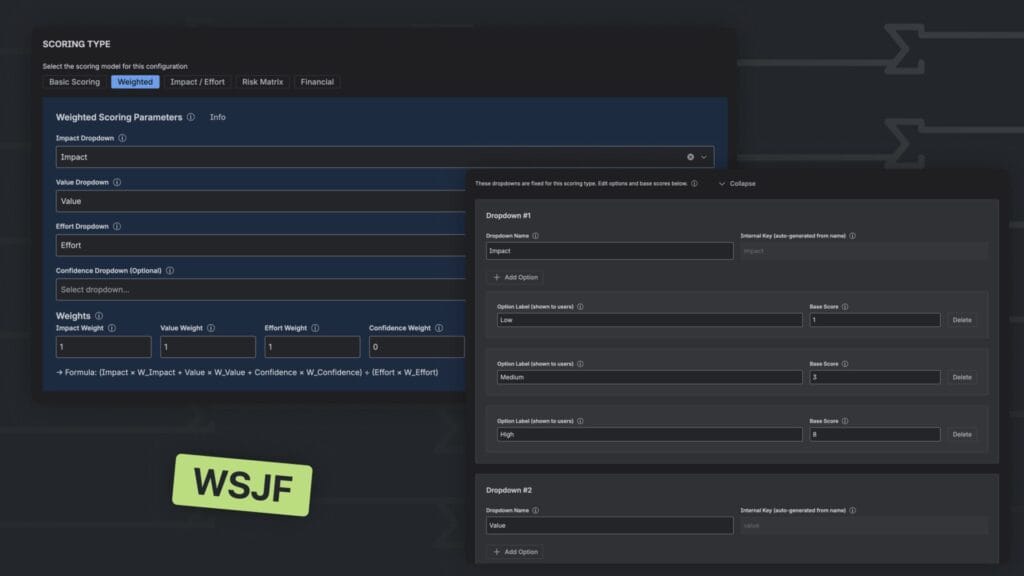
Best Model: Weighted
Dynamic Scoring’s Weighted scoring type allows formulas that simulate the WSJF ratio:
WSJF ≈ (Impact + Value) ÷ Effort
This is a proven simplified version used by many Agile orgs to make WSJF easier to apply.
Step-by-Step WSJF Configuration
1. Create the Configuration
Space Settings → Create New Configuration
Name: WSJF
2. Select Scoring Type
Choose: Weighted
3. Add the necessary dropdowns
| Component | Purpose | Example Options |
|---|---|---|
| Impact | Business importance / urgency | Low / Medium / High |
| Value | Customer value / revenue | Low / Medium / High |
| Effort | Delivery time / complexity | Small / Medium / Large |
Assign base scores (e.g., 1–3–8) to make scoring intuitive.
4. Set the weights
- Impact = 1
- Value = 1
- Effort = 1
- Confidence = 0
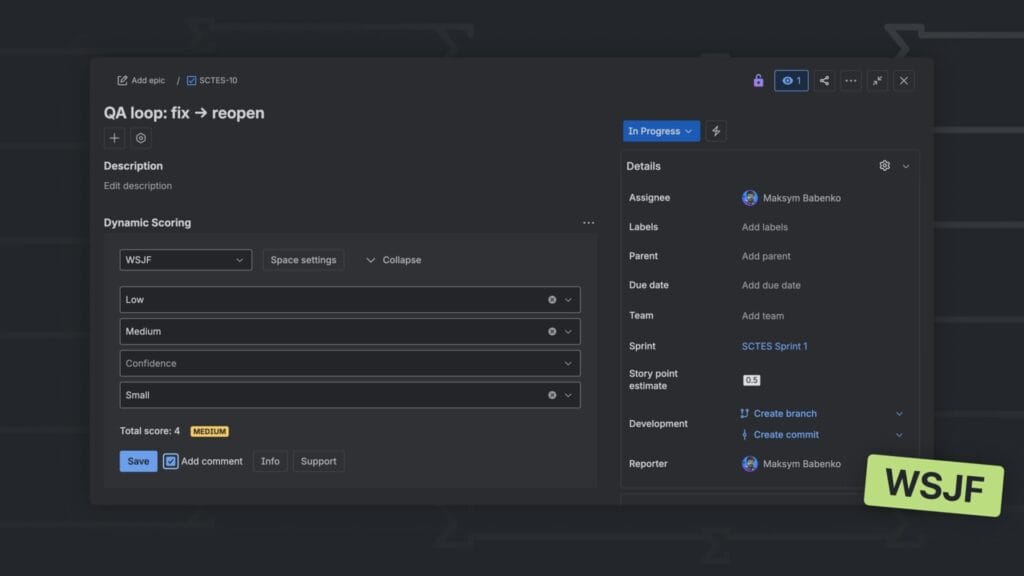
5. Save → Use in Jira Issue View
The score recalculates instantly when fields change.
Practical Tips for Using WSJF in Jira
• Use T-shirt sizes or Fibonacci for effort
Teams understand these intuitively, making scoring discussions shorter.
• Standardize base scores across teams
Consistency increases trust in the scoring process.
• Revisit WSJF values every 2–4 weeks
Cost of Delay can change rapidly in dynamic environments.
Beyond WSJF: Adaptive Prioritization
WSJF is powerful for flow optimization, but not ideal for every stage.
With Dynamic Scoring for Jira you can quickly switch to:
- ROI for financial planning
- RICE for discovery
- ICE for quick triage
- Risk Matrix for risk-sensitive environments
One app covers all prioritization frameworks your team may need.
Read More
[{"id":4680,"link":"https:\/\/typeswitch.net\/blog\/design-tokens-generator\/","name":"design-tokens-generator","thumbnail":{"url":"https:\/\/typeswitch.net\/wp-content\/uploads\/2026\/07\/visualsnag-catch-style-from-website-or-visual-reference.jpg","alt":"catch-style-from-website-or-visual-reference"},"title":"How to Generate Design Tokens From a Website Screenshot","postMeta":[],"author":{"name":"Babenko Maksym","link":"https:\/\/typeswitch.net\/blog\/author\/max-babenko\/"},"date":"\u041b\u0438\u043f 23, 2026","dateGMT":"2026-07-23 08:06:56","modifiedDate":"2026-07-23 08:30:46","modifiedDateGMT":"2026-07-23 08:30:46","commentCount":"0","commentStatus":"closed","categories":{"coma":"<a href=\"https:\/\/typeswitch.net\/blog\/category\/visualsnag\/\" rel=\"category tag\">VisualSnag<\/a>","space":"<a href=\"https:\/\/typeswitch.net\/blog\/category\/visualsnag\/\" rel=\"category tag\">VisualSnag<\/a>"},"taxonomies":{"post_tag":""},"readTime":{"min":6,"sec":34},"status":"publish","content":"Creating a consistent interface is much easier when visual decisions are written down as reusable rules. Those rules are called"},{"id":4524,"link":"https:\/\/typeswitch.net\/blog\/best-language-switcher-macos\/","name":"best-language-switcher-macos","thumbnail":{"url":"https:\/\/typeswitch.net\/wp-content\/uploads\/2024\/11\/Type-Switch-Personalize-Your-Button.png","alt":"Minimalist design of Type Switch app for language changes on macOS."},"title":"Best Language Switcher for macOS in 2026: Type Switch for Multilingual Typing","postMeta":[],"author":{"name":"Babenko Maksym","link":"https:\/\/typeswitch.net\/blog\/author\/max-babenko\/"},"date":"\u0422\u0440\u0430 17, 2026","dateGMT":"2026-05-17 13:47:43","modifiedDate":"2026-05-17 13:56:53","modifiedDateGMT":"2026-05-17 13:56:53","commentCount":"0","commentStatus":"closed","categories":{"coma":"<a href=\"https:\/\/typeswitch.net\/blog\/category\/uncategorized\/\" rel=\"category tag\">Uncategorized<\/a>","space":"<a href=\"https:\/\/typeswitch.net\/blog\/category\/uncategorized\/\" rel=\"category tag\">Uncategorized<\/a>"},"taxonomies":{"post_tag":""},"readTime":{"min":7,"sec":17},"status":"publish","content":"Working with multiple languages on your Mac should feel natural. But for many people, switching keyboard languages is still one"},{"id":4510,"link":"https:\/\/typeswitch.net\/blog\/best-developer-tools-macos-2026\/","name":"best-developer-tools-macos-2026","thumbnail":{"url":"https:\/\/typeswitch.net\/wp-content\/uploads\/2026\/05\/Preview_1_en.jpg","alt":"quick notes app for Mac"},"title":"Best Developer Tools for macOS in 2026: Essential Mac Apps for Coding","postMeta":[],"author":{"name":"Babenko Maksym","link":"https:\/\/typeswitch.net\/blog\/author\/max-babenko\/"},"date":"\u0422\u0440\u0430 17, 2026","dateGMT":"2026-05-17 07:32:59","modifiedDate":"2026-05-17 07:46:13","modifiedDateGMT":"2026-05-17 07:46:13","commentCount":"0","commentStatus":"closed","categories":{"coma":"<a href=\"https:\/\/typeswitch.net\/blog\/category\/uncategorized\/\" rel=\"category tag\">Uncategorized<\/a>","space":"<a href=\"https:\/\/typeswitch.net\/blog\/category\/uncategorized\/\" rel=\"category tag\">Uncategorized<\/a>"},"taxonomies":{"post_tag":""},"readTime":{"min":9,"sec":1},"status":"publish","content":"macOS is still one of the best environments for developers in 2026. You get a Unix-based system, strong hardware, great"},{"id":4402,"link":"https:\/\/typeswitch.net\/blog\/confluence-public-links-alternative\/","name":"confluence-public-links-alternative","thumbnail":{"url":"https:\/\/typeswitch.net\/wp-content\/uploads\/2026\/05\/Confluence-public-links-alternative.png","alt":"Illustration showing Confluence pages published to the public web with Public Pages for Confluence"},"title":"Confluence Public Links Alternative: Publish Pages with SEO, Branding and Custom Domains","postMeta":[],"author":{"name":"Babenko Maksym","link":"https:\/\/typeswitch.net\/blog\/author\/max-babenko\/"},"date":"\u0422\u0440\u0430 8, 2026","dateGMT":"2026-05-08 16:02:11","modifiedDate":"2026-05-08 17:59:18","modifiedDateGMT":"2026-05-08 17:59:18","commentCount":"0","commentStatus":"closed","categories":{"coma":"<a href=\"https:\/\/typeswitch.net\/blog\/category\/atlassian\/\" rel=\"category tag\">Atlassian<\/a>","space":"<a href=\"https:\/\/typeswitch.net\/blog\/category\/atlassian\/\" rel=\"category tag\">Atlassian<\/a>"},"taxonomies":{"post_tag":""},"readTime":{"min":7,"sec":27},"status":"publish","content":"By Maksym Babenko \u00b7 ~5 min read \u00b7 May 8, 2026 Confluence public links are useful when you need to share a page"}]